> ## Documentation Index
> Fetch the complete documentation index at: https://docs.monobot.ai/llms.txt
> Use this file to discover all available pages before exploring further.
# Altegio
The **Altegio integration** allows your AI agent to manage appointments, services, and staff using the Altegio platform.
It enables automation of booking flows, availability checks, and appointment management directly within your conversations.
 ***
## Adding Altegio Action
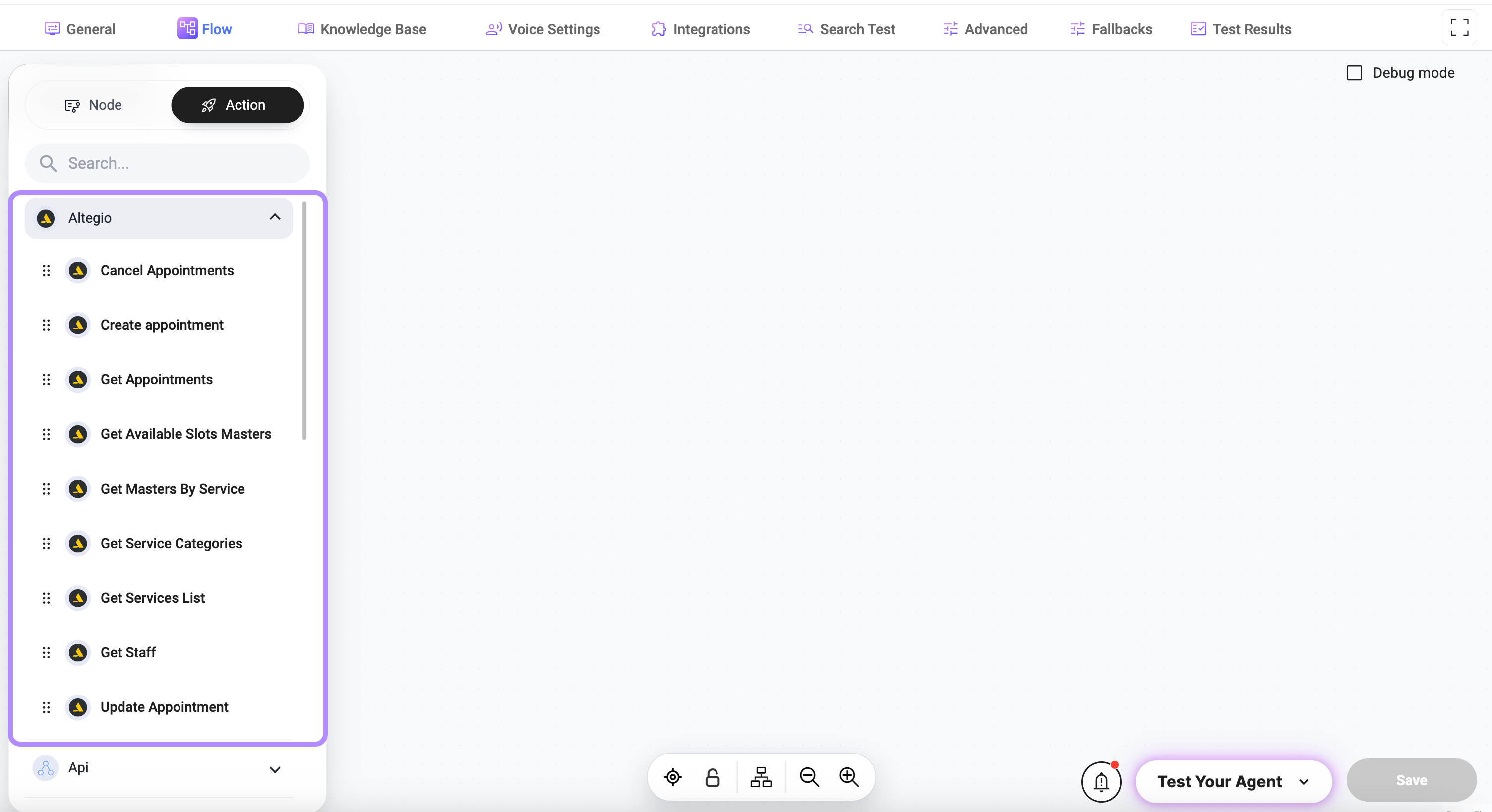
Click the **+ Add Element** button on the canvas to create a new element in your flow:
* select **Action**
* choose **Altegio**
* select the required tool
***
## Integration Setup
To use Altegio actions, you must configure the integration (navigate to the **Integration** tab). See [Altegio Integration](../../agent-settings/integrations)
for the details.
## Available Actions
Creates a new appointment in Altegio.
### Required
* **Staff ID**\
Type: `string`\
Identifier of the selected staff member
* **Service ID**\
Type: `string`\
Identifier of the selected service
* **Client Name**\
Type: `string`\
Full name of the client\
*Example:* `John Doe`
* **Client Phone**\
Type: `string`\
Client phone number\
*Example:* `+380XXXXXXXXX`
* **Appointment Time**\
Type: `string`\
Date and time (ISO 8601)\
*Example:* `2026-03-03T10:00:00+02:00`
### Optional
* **Client Email** — for notifications
* **First Cost / Cost** — override price
* **Discount** — apply discount
* **Session Length** — duration
* **Comment** — notes
* **SMS Reminder** — enable SMS
* **Email Reminder** — enable email
* **Save If Busy** — allow booking if slot is busy
* **Send SMS** — send confirmation
Updates an existing appointment.
### Required
* **Appointment ID**\
Type: `string`
* **Appointment DateTime**\
Type: `string`\
New date and time
* **Staff ID**\
Type: `string`
* **Service ID**\
Type: `string`
* **Seance Length**\
Type: `string`
* **Initial Cost**\
Type: `string`
* **Final Cost**\
Type: `string`
* **Client Name**\
Type: `string`
* **Client Phone**\
Type: `string`
### Optional
* **Client Email** — for notifications
* **Discount** — applied discount
* **Comment** — notes
Cancels an existing appointment.
### Required
* **Appointment ID**\
Type: `string`\
Unique identifier of the appointment\
*Example:* `123456789`
Retrieves appointment data.
### Optional
* **Client ID**\
Type: `string`
* **Start Date**\
Type: `string`\
*Example:* `2026-03-01`
* **Staff ID**\
Type: `string`
Returns available time slots.
### Required
* **Start Date**\
Type: `string`\
*Example:* `2026-03-01`
* **End Date**\
Type: `string`\
*Example:* `2026-03-07`
Retrieves staff by service.
### Required
* **Service Name**\
Type: `string`\
Name of the service\
*Example:* `Massage`
Retrieves services.
### Optional
* **Staff ID**\
Type: `string`\
Use `0` to include all staff
* **Category ID**\
Type: `string`\
Use `0` to include all categories
Retrieves service categories.
Retrieves staff members.
***
## Optional Parameters (General)
Some parameters are optional and provide flexibility:
* **Staff ID = 0** — apply to all staff
* **Category ID = 0** — include all categories
* **Client ID** — filter appointments
* **Start Date / End Date** — limit results
***
## Dynamic Values
Parameters can use values collected during node execution.
Examples:
* `Tools.create_appointment.parameters.name`
* `Tools.create_appointment.parameters.phone`
* `Tools.create_appointment.parameters.time`
***
## How It Works
* User requests a booking or service
* Flow collects required data
* Altegio action is triggered
* Request is sent using integration credentials
* Response is returned and used in the conversation
***
## Usage
Altegio integration is commonly used for:
* booking appointments
* checking availability
* managing reservations
* retrieving services and staff
* updating or canceling bookings
***
## Best Practices
* configure integration before using tools
* collect all required data before triggering
* validate date and time formats
* ensure correct service and staff selection
* handle unavailable slots gracefully
***
## Notes
* tools require valid credentials
* required fields must always be provided
* optional fields improve flexibility
* trigger tools only when sufficient data is collected
***
## Adding Altegio Action
Click the **+ Add Element** button on the canvas to create a new element in your flow:
* select **Action**
* choose **Altegio**
* select the required tool
***
## Integration Setup
To use Altegio actions, you must configure the integration (navigate to the **Integration** tab). See [Altegio Integration](../../agent-settings/integrations)
for the details.
## Available Actions
Creates a new appointment in Altegio.
### Required
* **Staff ID**\
Type: `string`\
Identifier of the selected staff member
* **Service ID**\
Type: `string`\
Identifier of the selected service
* **Client Name**\
Type: `string`\
Full name of the client\
*Example:* `John Doe`
* **Client Phone**\
Type: `string`\
Client phone number\
*Example:* `+380XXXXXXXXX`
* **Appointment Time**\
Type: `string`\
Date and time (ISO 8601)\
*Example:* `2026-03-03T10:00:00+02:00`
### Optional
* **Client Email** — for notifications
* **First Cost / Cost** — override price
* **Discount** — apply discount
* **Session Length** — duration
* **Comment** — notes
* **SMS Reminder** — enable SMS
* **Email Reminder** — enable email
* **Save If Busy** — allow booking if slot is busy
* **Send SMS** — send confirmation
Updates an existing appointment.
### Required
* **Appointment ID**\
Type: `string`
* **Appointment DateTime**\
Type: `string`\
New date and time
* **Staff ID**\
Type: `string`
* **Service ID**\
Type: `string`
* **Seance Length**\
Type: `string`
* **Initial Cost**\
Type: `string`
* **Final Cost**\
Type: `string`
* **Client Name**\
Type: `string`
* **Client Phone**\
Type: `string`
### Optional
* **Client Email** — for notifications
* **Discount** — applied discount
* **Comment** — notes
Cancels an existing appointment.
### Required
* **Appointment ID**\
Type: `string`\
Unique identifier of the appointment\
*Example:* `123456789`
Retrieves appointment data.
### Optional
* **Client ID**\
Type: `string`
* **Start Date**\
Type: `string`\
*Example:* `2026-03-01`
* **Staff ID**\
Type: `string`
Returns available time slots.
### Required
* **Start Date**\
Type: `string`\
*Example:* `2026-03-01`
* **End Date**\
Type: `string`\
*Example:* `2026-03-07`
Retrieves staff by service.
### Required
* **Service Name**\
Type: `string`\
Name of the service\
*Example:* `Massage`
Retrieves services.
### Optional
* **Staff ID**\
Type: `string`\
Use `0` to include all staff
* **Category ID**\
Type: `string`\
Use `0` to include all categories
Retrieves service categories.
Retrieves staff members.
***
## Optional Parameters (General)
Some parameters are optional and provide flexibility:
* **Staff ID = 0** — apply to all staff
* **Category ID = 0** — include all categories
* **Client ID** — filter appointments
* **Start Date / End Date** — limit results
***
## Dynamic Values
Parameters can use values collected during node execution.
Examples:
* `Tools.create_appointment.parameters.name`
* `Tools.create_appointment.parameters.phone`
* `Tools.create_appointment.parameters.time`
***
## How It Works
* User requests a booking or service
* Flow collects required data
* Altegio action is triggered
* Request is sent using integration credentials
* Response is returned and used in the conversation
***
## Usage
Altegio integration is commonly used for:
* booking appointments
* checking availability
* managing reservations
* retrieving services and staff
* updating or canceling bookings
***
## Best Practices
* configure integration before using tools
* collect all required data before triggering
* validate date and time formats
* ensure correct service and staff selection
* handle unavailable slots gracefully
***
## Notes
* tools require valid credentials
* required fields must always be provided
* optional fields improve flexibility
* trigger tools only when sufficient data is collected