> ## Documentation Index
> Fetch the complete documentation index at: https://docs.monobot.ai/llms.txt
> Use this file to discover all available pages before exploring further.
# API Call
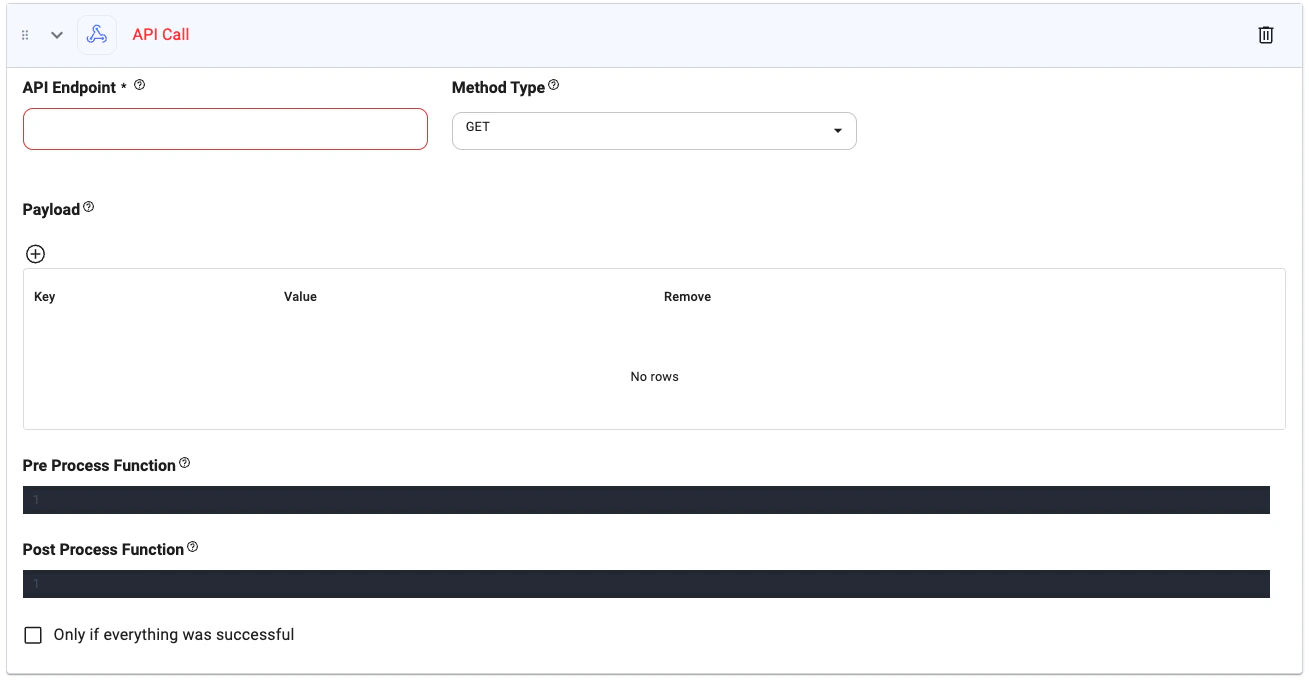
The **API Call** action allows your AI assistant to interact with external systems, services, or databases by sending HTTP requests. It supports all major HTTP methods and allows for custom pre/post-processing logic in Python.
This action is ideal for dynamic integrations like sending data, retrieving external information, triggering backend processes, or interacting with third-party APIs.
***
## What It Does
When triggered, this action performs a direct HTTP request to the specified API endpoint. You can define the method, payload, and optionally include pre-processing and post-processing logic to manipulate the request or handle the response.
> Use this for real-time data exchange or logic branching based on external API responses.
***
## Action Interface
 ***
## Configuration Options
**Type**: `string`
The complete URL of the API endpoint to call.
*Example:* `https://api.example.com/users`
**Type**: `string`
HTTP method used for the request. Choose from:
* `GET`
* `POST`
* `PUT`
* `DELETE`
*Default:* `GET`
**Type**: `object`\
Key-value pairs sent with the request to provide metadata such as authentication, content type, or API configuration.
*Example:*
```json theme={null}
{
"Authorization": "Bearer YOUR_TOKEN",
"Content-Type": "application/json"
}
```
**Type**: `object`
Key-value pairs to include in the request body or query params.
*Example:*
```json theme={null}
{
"email": "@userEmail",
"status": "active"
}
```
**Type**: `python`
Python function that runs **before** the API call. Useful for preparing parameters or transforming data.
*Example:*
```python theme={null}
def preprocess(params):
return {"email": params["email"].lower()}
```
**Type**: `python`
Python function that runs **after** receiving the API response. Use this to extract data or format it for the next step.
*Example:*
```python theme={null}
def handle(response):
return response.get("data", {})
```
**Type**: `boolean`
When checked, the next action will only execute if this API call completes successfully.
***
## Tips
* Use `@parameter` in the endpoint, payload, or code for dynamic inputs.
* Chain this with message generation or conditional actions based on response data.
* Return JSON or structured data to power follow-up tools like decision branches or summaries.
Let us know if you'd like ready-to-use API templates!
***
## Configuration Options
**Type**: `string`
The complete URL of the API endpoint to call.
*Example:* `https://api.example.com/users`
**Type**: `string`
HTTP method used for the request. Choose from:
* `GET`
* `POST`
* `PUT`
* `DELETE`
*Default:* `GET`
**Type**: `object`\
Key-value pairs sent with the request to provide metadata such as authentication, content type, or API configuration.
*Example:*
```json theme={null}
{
"Authorization": "Bearer YOUR_TOKEN",
"Content-Type": "application/json"
}
```
**Type**: `object`
Key-value pairs to include in the request body or query params.
*Example:*
```json theme={null}
{
"email": "@userEmail",
"status": "active"
}
```
**Type**: `python`
Python function that runs **before** the API call. Useful for preparing parameters or transforming data.
*Example:*
```python theme={null}
def preprocess(params):
return {"email": params["email"].lower()}
```
**Type**: `python`
Python function that runs **after** receiving the API response. Use this to extract data or format it for the next step.
*Example:*
```python theme={null}
def handle(response):
return response.get("data", {})
```
**Type**: `boolean`
When checked, the next action will only execute if this API call completes successfully.
***
## Tips
* Use `@parameter` in the endpoint, payload, or code for dynamic inputs.
* Chain this with message generation or conditional actions based on response data.
* Return JSON or structured data to power follow-up tools like decision branches or summaries.
Let us know if you'd like ready-to-use API templates!