> ## Documentation Index
> Fetch the complete documentation index at: https://docs.monobot.ai/llms.txt
> Use this file to discover all available pages before exploring further.
# Custom Conditions
## Overview
Custom conditions allow you to route the flow based on the result of a previous action or function.
They are useful when an action returns a specific value and the next step should depend on that result.
For example, a function can evaluate whether a request is urgent and return:
* `True`
* `False`
The next action can then be triggered depending on which value was returned.
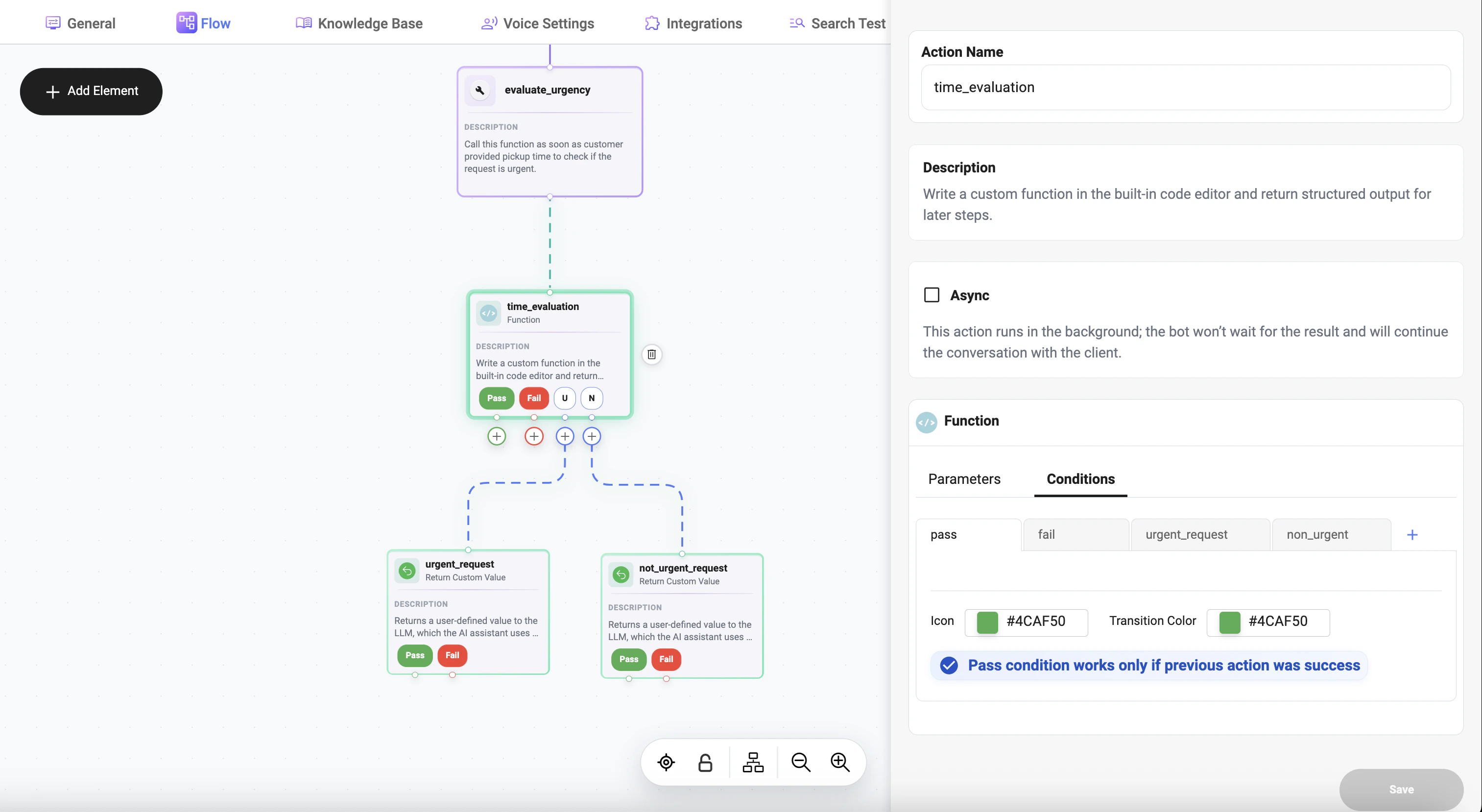 ## How It Works
A custom condition compares:
* the **result of an action or function**
* with a **defined value**
* using a selected **operator**
If the condition matches, the corresponding branch is triggered.
***
## Example
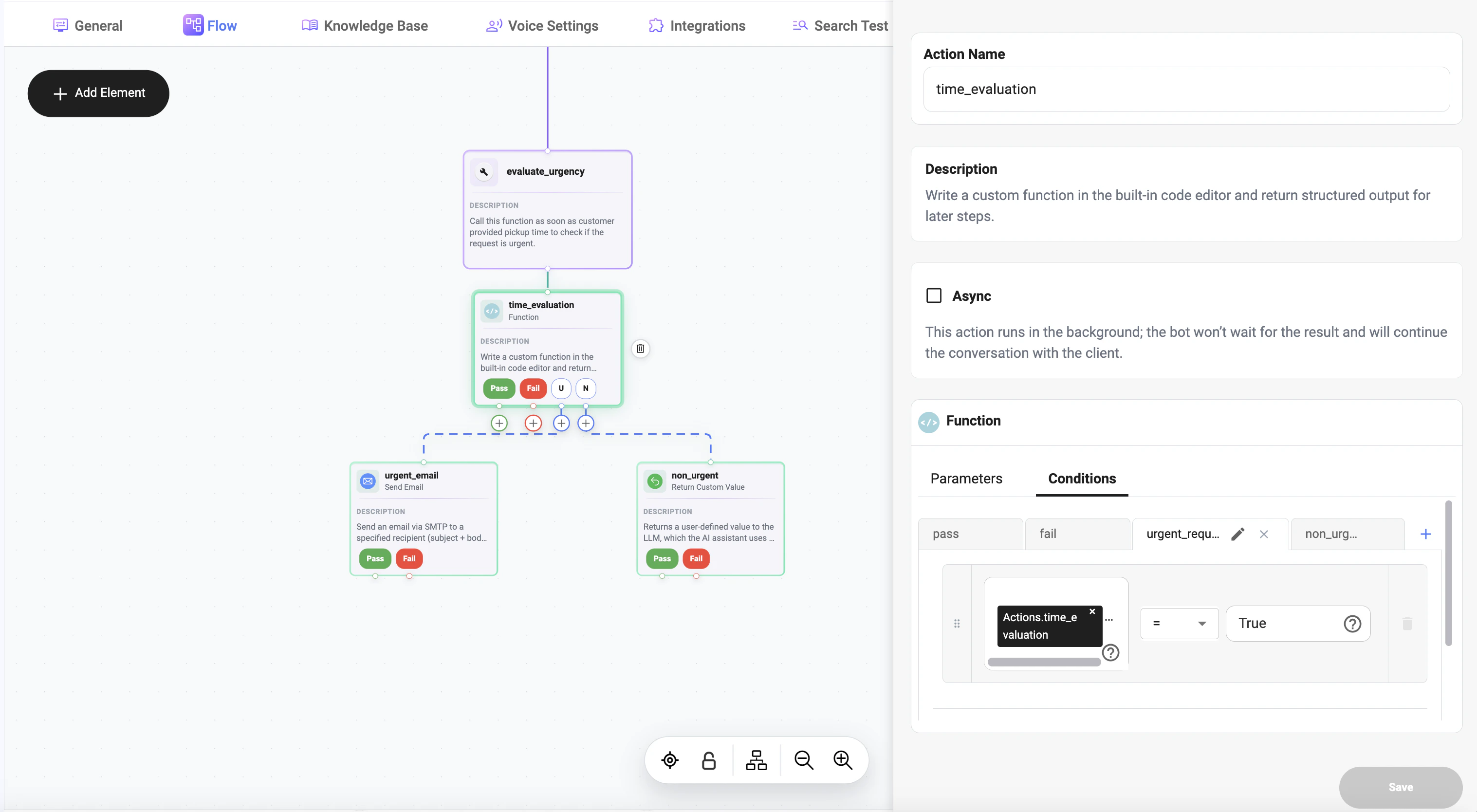
A function called `time_evaluation` checks whether the request is urgent.
The function returns:
* `True` — urgent request
* `False` — non-urgent request
You can then create separate branches:
* if result `=` `True` → go to urgent handling step
* if result `=` `False` → go to non-urgent handling step
## How It Works
A custom condition compares:
* the **result of an action or function**
* with a **defined value**
* using a selected **operator**
If the condition matches, the corresponding branch is triggered.
***
## Example
A function called `time_evaluation` checks whether the request is urgent.
The function returns:
* `True` — urgent request
* `False` — non-urgent request
You can then create separate branches:
* if result `=` `True` → go to urgent handling step
* if result `=` `False` → go to non-urgent handling step
 ## Use Case
Example flow:
1. Run `time_evaluation`
2. Check returned value in a custom condition
3. Route the flow depending on the result
Possible logic:
time\_evaluation `=` True → urgent request\
time\_evaluation `=` False → non-urgent request
***
## Condition Structure
A custom condition consists of three parts:
* **Left value** — result of the previous action or function
* **Operator** — comparison rule
* **Right value** — expected value to compare against
Example:
Actions.time\_evaluation `=` True
***
## Supported Operators
The condition builder supports comparison operators such as:
| Operator | Meaning |
| -------- | ---------------- |
| `=` | Equals |
| `!=` | Not equals |
| `>` | Greater than |
| `>=` | Greater or equal |
| `<` | Less than |
| `<=` | Less or equal |
* `IN`
* `NOT IN`
* `STARTS WITH`
* `ENDS WITH`
* `MATCHES REGEX`
* `CONTAINS`
***
## Passing Action Results
You can pass the result of a previous action or function into the condition.
Example:
Actions.time\_evaluation
Then compare it against the expected value:
True
So the full condition becomes:
Actions.time\_evaluation `=` True
***
## Typical Scenarios
Custom conditions are commonly used for:
* urgent vs non-urgent request routing
* success vs failure handling
* matching specific function results
* checking flags like True / False
* branching based on calculated values
***
## Example: Urgent Request Routing
Condition 1:
Actions.time\_evaluation `=` True
Next step:
* trigger urgent request prompt
* escalate to priority handling (e.g., send an email to the support team)
Condition 2:
Actions.time\_evaluation `=` False
Next step:
* continue regular flow
* send standard response
* route to non-urgent branch
***
## Best Practices
* make sure the function returns a clear and predictable value
* compare values using the correct type and format
* use simple conditions when possible
* create separate branches for different expected outcomes
* test returned values before using them in production flows
***
## Notes
* custom conditions depend on the result of a previous action
* the compared value can be boolean, text, number, or structured output
* conditions are useful for building flexible and dynamic branching logic
***
## Summary
Custom conditions allow you to evaluate the result of an action or function and decide what should happen next.
This makes it possible to build flows where the next action depends on specific returned values, such as True or False.
## Use Case
Example flow:
1. Run `time_evaluation`
2. Check returned value in a custom condition
3. Route the flow depending on the result
Possible logic:
time\_evaluation `=` True → urgent request\
time\_evaluation `=` False → non-urgent request
***
## Condition Structure
A custom condition consists of three parts:
* **Left value** — result of the previous action or function
* **Operator** — comparison rule
* **Right value** — expected value to compare against
Example:
Actions.time\_evaluation `=` True
***
## Supported Operators
The condition builder supports comparison operators such as:
| Operator | Meaning |
| -------- | ---------------- |
| `=` | Equals |
| `!=` | Not equals |
| `>` | Greater than |
| `>=` | Greater or equal |
| `<` | Less than |
| `<=` | Less or equal |
* `IN`
* `NOT IN`
* `STARTS WITH`
* `ENDS WITH`
* `MATCHES REGEX`
* `CONTAINS`
***
## Passing Action Results
You can pass the result of a previous action or function into the condition.
Example:
Actions.time\_evaluation
Then compare it against the expected value:
True
So the full condition becomes:
Actions.time\_evaluation `=` True
***
## Typical Scenarios
Custom conditions are commonly used for:
* urgent vs non-urgent request routing
* success vs failure handling
* matching specific function results
* checking flags like True / False
* branching based on calculated values
***
## Example: Urgent Request Routing
Condition 1:
Actions.time\_evaluation `=` True
Next step:
* trigger urgent request prompt
* escalate to priority handling (e.g., send an email to the support team)
Condition 2:
Actions.time\_evaluation `=` False
Next step:
* continue regular flow
* send standard response
* route to non-urgent branch
***
## Best Practices
* make sure the function returns a clear and predictable value
* compare values using the correct type and format
* use simple conditions when possible
* create separate branches for different expected outcomes
* test returned values before using them in production flows
***
## Notes
* custom conditions depend on the result of a previous action
* the compared value can be boolean, text, number, or structured output
* conditions are useful for building flexible and dynamic branching logic
***
## Summary
Custom conditions allow you to evaluate the result of an action or function and decide what should happen next.
This makes it possible to build flows where the next action depends on specific returned values, such as True or False.