> ## Documentation Index
> Fetch the complete documentation index at: https://docs.monobot.ai/llms.txt
> Use this file to discover all available pages before exploring further.
# Google Actions
## Overview
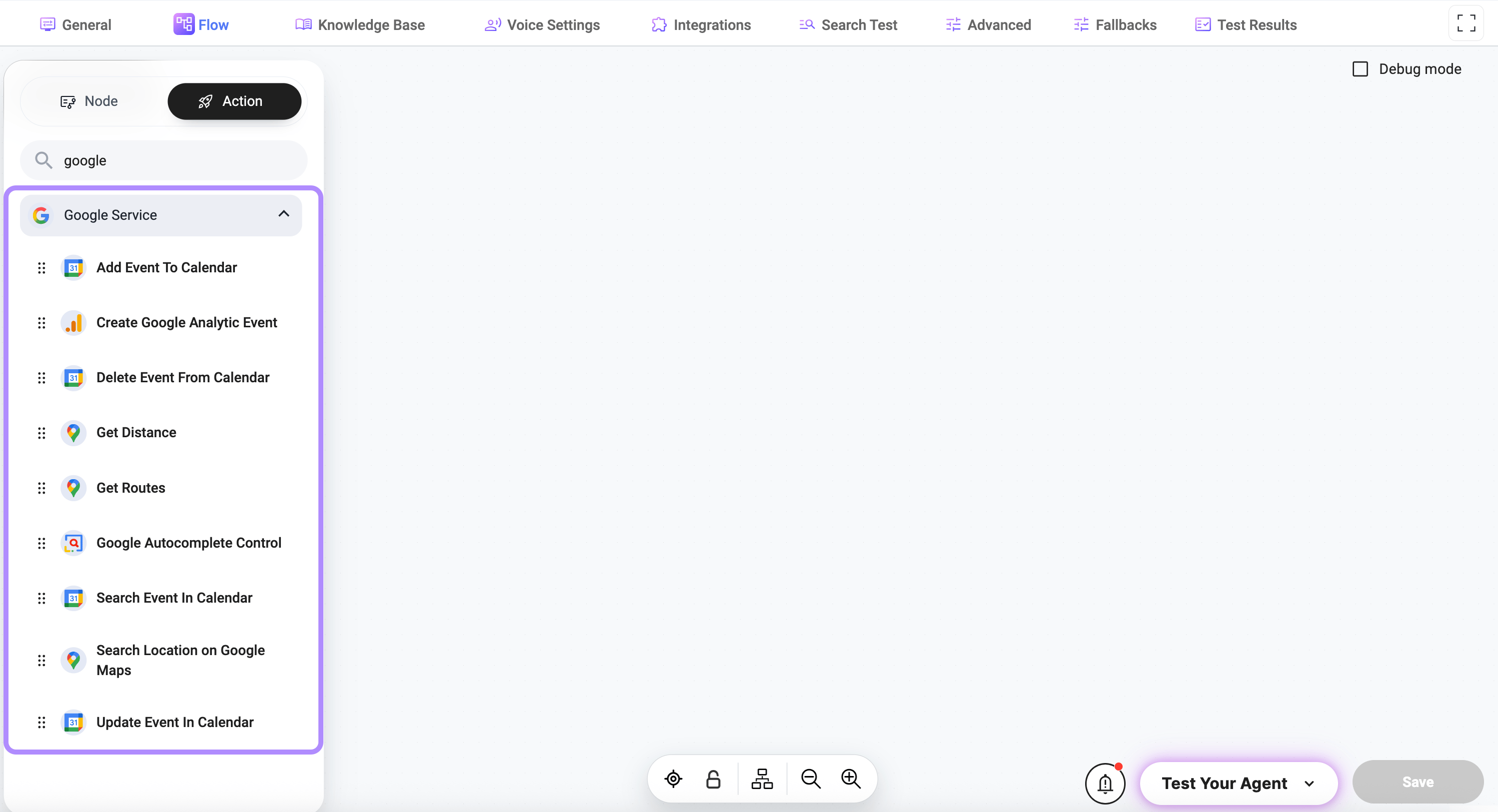
The **Google Actions** integration allows your AI agent to interact with Google services such as Calendar, Maps, and Analytics.
It enables automation of:
* scheduling and managing calendar events
* retrieving routes and distances
* searching locations and places
* tracking analytics events
 ***
## Supported Services
This integration covers the following Google services:
* Google Calendar
* Google Maps
* Google Analytics
***
## Integration Setup
To use Google tools, navigate to the 'Integration' and connect your account.
Tools will not work without an active Google integration.
***
## Available Actions
### Calendar
Creates a new event in the user’s connected Google Calendar.
This action can be used to automate scheduling for meetings, appointments, reminders, or internal events. It supports rich event configuration including attendees, reminders, recurrence, and location details.
***
### Required data
* **title**\
Type: `string`\
The name of the event.\
*Example:* `Product Demo with Client`
* **start time**\
Type: `string`\
Event start date and time in ISO 8601 or valid datetime format.\
*Example:* `2025-04-10T15:00:00`
***
### Optional data
* **duration**\
Type: `number`\
Duration of the event in minutes.\
Default: `60`
* **calendar identifier**\
Type: `string`\
Target calendar. If not provided, the default calendar is used.\
Default: `primary`
* **description**\
Type: `string`\
Additional details or notes for the event.
* **timezone**\
Type: `string`\
Timezone used for the event.
* **repeat**\
Type: `string`\
Recurrence rule for the event.\
Options: `None`, `Daily`, `Weekly`, `Monthly`, `Yearly`, `Weekdays`
* **location**\
Type: `string`\
Physical or virtual location of the event.
* **Google Meet link**\
Type: `string`\
Video meeting link associated with the event.
* **reminders (email)**\
Type: `string`\
Comma-separated minutes before the event for email reminders.\
*Example:* `1440,60`
* **reminders (popup)**\
Type: `string`\
Comma-separated minutes before the event for popup reminders.\
*Example:* `30,10`
* **attendees**\
Type: `string`\
Comma-separated list of attendee emails.\
*Example:* `client@example.com, sales@example.com`
* **all-day flag**\
Type: `boolean`\
Marks the event as an all-day event.
Searches for events in the user’s connected Google Calendar based on keywords, time range, and filters.
This action is useful for checking availability, retrieving existing bookings, or validating scheduled events before creating or updating them.
***
### Required data
* **query**\
Type: `string`\
Keyword(s) used to search event titles and descriptions. Can also be passed dynamically via `@param`.\
*Example:* `demo`, `@customerName`
***
### Optional data
* **calendar identifier**\
Type: `string`\
Calendar to search in.\
Default: `primary`
* **timezone**\
Type: `string`\
Timezone used to interpret date and time filters.\
Default: system / UTC
* **start time**\
Type: `string`\
Start of the time range (ISO 8601 or valid datetime).\
*Example:* `2025-04-01T00:00:00`
* **end time**\
Type: `string`\
End of the time range (ISO 8601 or valid datetime).\
*Example:* `2025-04-30T23:59:59`
* **number of events to consider**\
Type: `number`\
Maximum number of events to scan.\
Default: `100`
* **single event flag**\
Type: `boolean`\
When enabled, recurring events are expanded into individual instances.\
Default: `true`
Updates an existing event in the user’s connected Google Calendar using its unique event ID.
This action is useful for rescheduling meetings, updating attendees, or modifying event details such as time, location, or description.
***
### Required data
* **event ID**\
Type: `string`\
Unique identifier of the event to update.\
*Example:* `5pq7fc8gc0d3qqln42v2a2ab50`
***
### Optional data
* **title**\
Type: `string`\
Updated event title.\
*Example:* `Updated: Onboarding Call with Sarah`
* **description**\
Type: `string`\
Updated event description.
* **calendar identifier**\
Type: `string`\
Calendar where the event is stored.\
Default: `primary`
* **start time**\
Type: `string`\
New start date and time (ISO 8601 or valid datetime).\
*Example:* `2025-04-15T14:30:00`
* **duration**\
Type: `number`\
Updated duration in minutes.\
Default: `60`
* **timezone**\
Type: `string`\
Timezone for the updated event.
* **location**\
Type: `string`\
Updated physical or virtual location.
* **Google Meet link**\
Type: `string`\
Video meeting link associated with the event.
* **attendees**\
Type: `string`\
Comma-separated list of attendee emails.\
*Example:* `alice@example.com, bob@example.com`
Deletes an existing event from the user’s connected Google Calendar using its unique event ID.
This action is useful for handling cancellations, cleanup flows, or removing outdated events before creating updated ones.
***
### Required data
* **event ID**\
Type: `string`\
Unique identifier of the event to delete. This value is returned when the event is created.\
*Example:* `5pq7fc8gc0d3qqln42v2a2ab50`
***
### Optional data
* **calendar identifier**\
Type: `string`\
Calendar where the event is stored.\
Default: `primary`
***
### Maps
Calculates the distance between two locations using Google Maps.
This action is useful for logistics, delivery estimation, route planning, and travel calculations.
***
### Required data
* **point A**\
Type: `string`\
Origin address or coordinates (latitude,longitude).\
*Example:* `1600 Amphitheatre Parkway, Mountain View, CA`
* **point B**\
Type: `string`\
Destination address or coordinates.\
*Example:* `1 Infinite Loop, Cupertino, CA`
Retrieves route information between two locations using Google Maps.
This action is useful for navigation, travel planning, and estimating distance and duration between points.
***
### Required data
* **point A**\
Type: `string`\
Origin address or coordinates (latitude,longitude).\
*Example:* `1600 Amphitheatre Parkway, Mountain View, CA`
* **point B**\
Type: `string`\
Destination address or coordinates.\
*Example:* `1 Infinite Loop, Cupertino, CA`
* **distance measurement format**\
Type: `string`\
Unit system used for distance calculation.\
Default: `metric`
***
### Optional data
* **region code**\
Type: `string`\
State or region code to refine routing results.
* **country code**\
Type: `string`\
Country code to localize routing behavior.
* **travel mode**\
Type: `string`\
Mode of transportation.\
Default: `driving`
Searches for locations using Google Maps based on a query and optional filters.
This action is useful for finding places, validating addresses, or retrieving location data for further use in flows.
***
### Required data
* **query**\
Type: `string`\
The search string for Google Maps. Can be a full address, business name, or general location phrase.\
*Example:* `Starbucks near 94103`, `1600 Amphitheatre Parkway`
***
### Optional data
* **latitude and longitude**\
Type: `string`\
Coordinates used to bias the search results.\
*Example:* `37.4224764,-122.0842499`
* **radius**\
Type: `number`\
Search radius in meters around the provided coordinates.\
*Example:* `5000` (5 km)
* **country**\
Type: `string`\
Country filter for the search.
* **state**\
Type: `string`\
State or region filter.
* **city**\
Type: `string`\
City filter for more precise results.
* **marks**\
Type: `string`\
Types of locations to search for (e.g., restaurant, hospital).
* **result pattern name**\
Type: `string`\
Variable name used to store results.\
Default: `search_result`
* **add coordinate flag**\
Type: `boolean`\
Includes coordinates in the result output.
* **hide action result flag**\
Type: `boolean`\
Hides the action result from being displayed to the user.
Provides location suggestions using Google Autocomplete based on partial input and optional filters.
This action is useful for building dynamic address inputs, improving user experience, and storing structured location data for further use in flows.
***
### Required data
* **value**\
Type: `string`\
Partial input used to generate autocomplete suggestions.\
*Example:* `New Yor`
***
### Optional data
* **label name**\
Type: `string`\
Label used to identify or display the selected result.
* **latitude and longitude**\
Type: `string`\
Coordinates used to bias suggestions toward a specific area.\
*Example:* `37.4224764,-122.0842499`
* **radius**\
Type: `number`\
Search radius in meters around the provided coordinates.
* **country**\
Type: `string`\
Country filter for suggestions.
* **state**\
Type: `string`\
State or region filter.
* **city**\
Type: `string`\
City filter for more precise suggestions.
* **marks**\
Type: `string`\
Additional filters or tags applied to suggestions.
* **state variable name**\
Type: `string`\
Variable name used to store the selected result for later use in the flow.
***
### Analytics
Sends a custom event to Google Analytics (GA4) for tracking user actions and interactions.
This action is useful for analytics, conversion tracking, user behavior monitoring, and event-based reporting.
***
### Required data
* **measurement ID**\
Type: `string`\
Google Analytics Measurement ID.\
*Example:* `G-XXXXXXXXXX`
* **API secret**\
Type: `string`\
API secret used for secure event tracking.
* **event name**\
Type: `string`\
Name of the event to be tracked.\
*Example:* `booking_completed`, `button_click`
***
### Optional data
* **debug mode**\
Type: `boolean`\
Enables debug mode for testing events in Google Analytics DebugView.
***
## Best Practices
* Always validate input before triggering actions
* Use correct time formats (ISO 8601 for calendar events)
* Avoid duplicate event creation
* Handle API errors gracefully
* Ensure location inputs are well formatted
***
## Notes
* Supports use of `@parameters` for dynamic route calculations.
* Some actions require additional permissions depending on the Google service
* Rate limits may apply depending on API usage
* Ensure API keys and tokens are securely stored
***
***
## Supported Services
This integration covers the following Google services:
* Google Calendar
* Google Maps
* Google Analytics
***
## Integration Setup
To use Google tools, navigate to the 'Integration' and connect your account.
Tools will not work without an active Google integration.
***
## Available Actions
### Calendar
Creates a new event in the user’s connected Google Calendar.
This action can be used to automate scheduling for meetings, appointments, reminders, or internal events. It supports rich event configuration including attendees, reminders, recurrence, and location details.
***
### Required data
* **title**\
Type: `string`\
The name of the event.\
*Example:* `Product Demo with Client`
* **start time**\
Type: `string`\
Event start date and time in ISO 8601 or valid datetime format.\
*Example:* `2025-04-10T15:00:00`
***
### Optional data
* **duration**\
Type: `number`\
Duration of the event in minutes.\
Default: `60`
* **calendar identifier**\
Type: `string`\
Target calendar. If not provided, the default calendar is used.\
Default: `primary`
* **description**\
Type: `string`\
Additional details or notes for the event.
* **timezone**\
Type: `string`\
Timezone used for the event.
* **repeat**\
Type: `string`\
Recurrence rule for the event.\
Options: `None`, `Daily`, `Weekly`, `Monthly`, `Yearly`, `Weekdays`
* **location**\
Type: `string`\
Physical or virtual location of the event.
* **Google Meet link**\
Type: `string`\
Video meeting link associated with the event.
* **reminders (email)**\
Type: `string`\
Comma-separated minutes before the event for email reminders.\
*Example:* `1440,60`
* **reminders (popup)**\
Type: `string`\
Comma-separated minutes before the event for popup reminders.\
*Example:* `30,10`
* **attendees**\
Type: `string`\
Comma-separated list of attendee emails.\
*Example:* `client@example.com, sales@example.com`
* **all-day flag**\
Type: `boolean`\
Marks the event as an all-day event.
Searches for events in the user’s connected Google Calendar based on keywords, time range, and filters.
This action is useful for checking availability, retrieving existing bookings, or validating scheduled events before creating or updating them.
***
### Required data
* **query**\
Type: `string`\
Keyword(s) used to search event titles and descriptions. Can also be passed dynamically via `@param`.\
*Example:* `demo`, `@customerName`
***
### Optional data
* **calendar identifier**\
Type: `string`\
Calendar to search in.\
Default: `primary`
* **timezone**\
Type: `string`\
Timezone used to interpret date and time filters.\
Default: system / UTC
* **start time**\
Type: `string`\
Start of the time range (ISO 8601 or valid datetime).\
*Example:* `2025-04-01T00:00:00`
* **end time**\
Type: `string`\
End of the time range (ISO 8601 or valid datetime).\
*Example:* `2025-04-30T23:59:59`
* **number of events to consider**\
Type: `number`\
Maximum number of events to scan.\
Default: `100`
* **single event flag**\
Type: `boolean`\
When enabled, recurring events are expanded into individual instances.\
Default: `true`
Updates an existing event in the user’s connected Google Calendar using its unique event ID.
This action is useful for rescheduling meetings, updating attendees, or modifying event details such as time, location, or description.
***
### Required data
* **event ID**\
Type: `string`\
Unique identifier of the event to update.\
*Example:* `5pq7fc8gc0d3qqln42v2a2ab50`
***
### Optional data
* **title**\
Type: `string`\
Updated event title.\
*Example:* `Updated: Onboarding Call with Sarah`
* **description**\
Type: `string`\
Updated event description.
* **calendar identifier**\
Type: `string`\
Calendar where the event is stored.\
Default: `primary`
* **start time**\
Type: `string`\
New start date and time (ISO 8601 or valid datetime).\
*Example:* `2025-04-15T14:30:00`
* **duration**\
Type: `number`\
Updated duration in minutes.\
Default: `60`
* **timezone**\
Type: `string`\
Timezone for the updated event.
* **location**\
Type: `string`\
Updated physical or virtual location.
* **Google Meet link**\
Type: `string`\
Video meeting link associated with the event.
* **attendees**\
Type: `string`\
Comma-separated list of attendee emails.\
*Example:* `alice@example.com, bob@example.com`
Deletes an existing event from the user’s connected Google Calendar using its unique event ID.
This action is useful for handling cancellations, cleanup flows, or removing outdated events before creating updated ones.
***
### Required data
* **event ID**\
Type: `string`\
Unique identifier of the event to delete. This value is returned when the event is created.\
*Example:* `5pq7fc8gc0d3qqln42v2a2ab50`
***
### Optional data
* **calendar identifier**\
Type: `string`\
Calendar where the event is stored.\
Default: `primary`
***
### Maps
Calculates the distance between two locations using Google Maps.
This action is useful for logistics, delivery estimation, route planning, and travel calculations.
***
### Required data
* **point A**\
Type: `string`\
Origin address or coordinates (latitude,longitude).\
*Example:* `1600 Amphitheatre Parkway, Mountain View, CA`
* **point B**\
Type: `string`\
Destination address or coordinates.\
*Example:* `1 Infinite Loop, Cupertino, CA`
Retrieves route information between two locations using Google Maps.
This action is useful for navigation, travel planning, and estimating distance and duration between points.
***
### Required data
* **point A**\
Type: `string`\
Origin address or coordinates (latitude,longitude).\
*Example:* `1600 Amphitheatre Parkway, Mountain View, CA`
* **point B**\
Type: `string`\
Destination address or coordinates.\
*Example:* `1 Infinite Loop, Cupertino, CA`
* **distance measurement format**\
Type: `string`\
Unit system used for distance calculation.\
Default: `metric`
***
### Optional data
* **region code**\
Type: `string`\
State or region code to refine routing results.
* **country code**\
Type: `string`\
Country code to localize routing behavior.
* **travel mode**\
Type: `string`\
Mode of transportation.\
Default: `driving`
Searches for locations using Google Maps based on a query and optional filters.
This action is useful for finding places, validating addresses, or retrieving location data for further use in flows.
***
### Required data
* **query**\
Type: `string`\
The search string for Google Maps. Can be a full address, business name, or general location phrase.\
*Example:* `Starbucks near 94103`, `1600 Amphitheatre Parkway`
***
### Optional data
* **latitude and longitude**\
Type: `string`\
Coordinates used to bias the search results.\
*Example:* `37.4224764,-122.0842499`
* **radius**\
Type: `number`\
Search radius in meters around the provided coordinates.\
*Example:* `5000` (5 km)
* **country**\
Type: `string`\
Country filter for the search.
* **state**\
Type: `string`\
State or region filter.
* **city**\
Type: `string`\
City filter for more precise results.
* **marks**\
Type: `string`\
Types of locations to search for (e.g., restaurant, hospital).
* **result pattern name**\
Type: `string`\
Variable name used to store results.\
Default: `search_result`
* **add coordinate flag**\
Type: `boolean`\
Includes coordinates in the result output.
* **hide action result flag**\
Type: `boolean`\
Hides the action result from being displayed to the user.
Provides location suggestions using Google Autocomplete based on partial input and optional filters.
This action is useful for building dynamic address inputs, improving user experience, and storing structured location data for further use in flows.
***
### Required data
* **value**\
Type: `string`\
Partial input used to generate autocomplete suggestions.\
*Example:* `New Yor`
***
### Optional data
* **label name**\
Type: `string`\
Label used to identify or display the selected result.
* **latitude and longitude**\
Type: `string`\
Coordinates used to bias suggestions toward a specific area.\
*Example:* `37.4224764,-122.0842499`
* **radius**\
Type: `number`\
Search radius in meters around the provided coordinates.
* **country**\
Type: `string`\
Country filter for suggestions.
* **state**\
Type: `string`\
State or region filter.
* **city**\
Type: `string`\
City filter for more precise suggestions.
* **marks**\
Type: `string`\
Additional filters or tags applied to suggestions.
* **state variable name**\
Type: `string`\
Variable name used to store the selected result for later use in the flow.
***
### Analytics
Sends a custom event to Google Analytics (GA4) for tracking user actions and interactions.
This action is useful for analytics, conversion tracking, user behavior monitoring, and event-based reporting.
***
### Required data
* **measurement ID**\
Type: `string`\
Google Analytics Measurement ID.\
*Example:* `G-XXXXXXXXXX`
* **API secret**\
Type: `string`\
API secret used for secure event tracking.
* **event name**\
Type: `string`\
Name of the event to be tracked.\
*Example:* `booking_completed`, `button_click`
***
### Optional data
* **debug mode**\
Type: `boolean`\
Enables debug mode for testing events in Google Analytics DebugView.
***
## Best Practices
* Always validate input before triggering actions
* Use correct time formats (ISO 8601 for calendar events)
* Avoid duplicate event creation
* Handle API errors gracefully
* Ensure location inputs are well formatted
***
## Notes
* Supports use of `@parameters` for dynamic route calculations.
* Some actions require additional permissions depending on the Google service
* Rate limits may apply depending on API usage
* Ensure API keys and tokens are securely stored
***