> ## Documentation Index
> Fetch the complete documentation index at: https://docs.monobot.ai/llms.txt
> Use this file to discover all available pages before exploring further.
# SIP Connection
> Configure SIP integration to enable inbound voice calls, routing, and call transfers.
## Overview
SIP (Session Initiation Protocol) allows your bot to connect to telephony systems and handle voice calls.
With SIP integration, you can:
* Receive incoming calls
* Transfer calls to agents or external systems
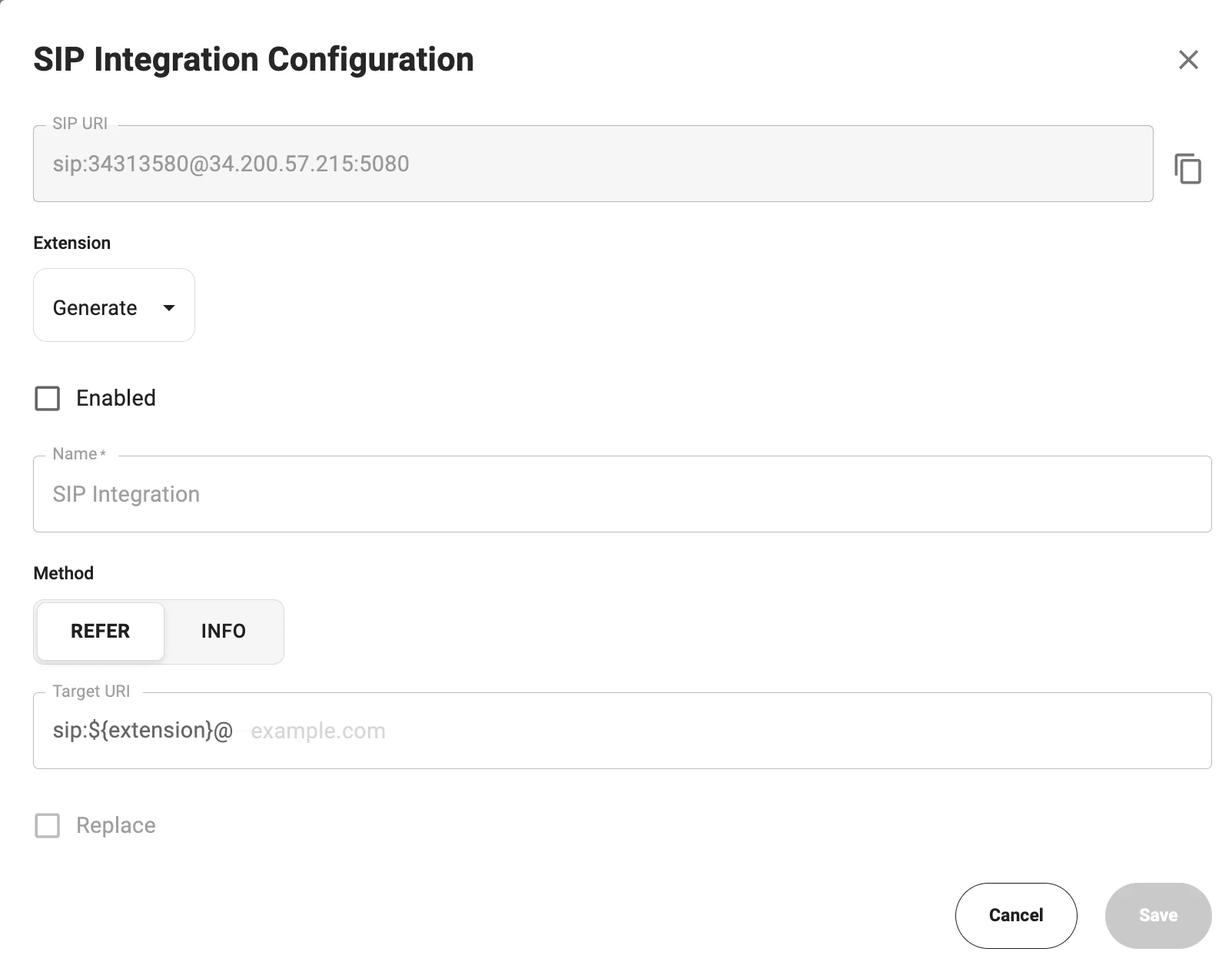 ## Configure SIP Integration
### 1. Open SIP Settings
1. Go to **AI Agents**
2. Open your bot
3. Navigate to **Integrations**
4. Click **Configure** in the **SIP Integration** block
### 2. SIP URI
The system generates a SIP URI automatically:
```
sip:@:
```
**Example:**
```
sip:34313580@34.200.57.215:5080
```
### 3. Extension
* Can be generated automatically
* Used as an internal routing identifier
### 4. Enable Integration
Enable the **Enabled** checkbox to activate SIP.
### 5. Method
| Method | Description |
| ------ | -------------------------------------------- |
| REFER | Standard SIP transfer (recommended) |
| INFO | Alternative method if REFER is not supported |
### 6. Target URI
Defines the destination for SIP call routing.
The Target URI tells the system where to send the call (typically your SIP provider or PBX).\
The `${extension}` placeholder is automatically replaced with the configured extension during the call.
```
sip:${extension}@
```
**Example:**
```
sip:${extension}@44.207.193.100
```
### 7. Save
Click **Save** to apply changes.
## Configure SIP Integration
### 1. Open SIP Settings
1. Go to **AI Agents**
2. Open your bot
3. Navigate to **Integrations**
4. Click **Configure** in the **SIP Integration** block
### 2. SIP URI
The system generates a SIP URI automatically:
```
sip:@:
```
**Example:**
```
sip:34313580@34.200.57.215:5080
```
### 3. Extension
* Can be generated automatically
* Used as an internal routing identifier
### 4. Enable Integration
Enable the **Enabled** checkbox to activate SIP.
### 5. Method
| Method | Description |
| ------ | -------------------------------------------- |
| REFER | Standard SIP transfer (recommended) |
| INFO | Alternative method if REFER is not supported |
### 6. Target URI
Defines the destination for SIP call routing.
The Target URI tells the system where to send the call (typically your SIP provider or PBX).\
The `${extension}` placeholder is automatically replaced with the configured extension during the call.
```
sip:${extension}@
```
**Example:**
```
sip:${extension}@44.207.193.100
```
### 7. Save
Click **Save** to apply changes.