> ## Documentation Index
> Fetch the complete documentation index at: https://docs.monobot.ai/llms.txt
> Use this file to discover all available pages before exploring further.
# Node
The **Flow** tab defines how your AI agent behaves by organizing the interaction into a sequence of **connected nodes**.
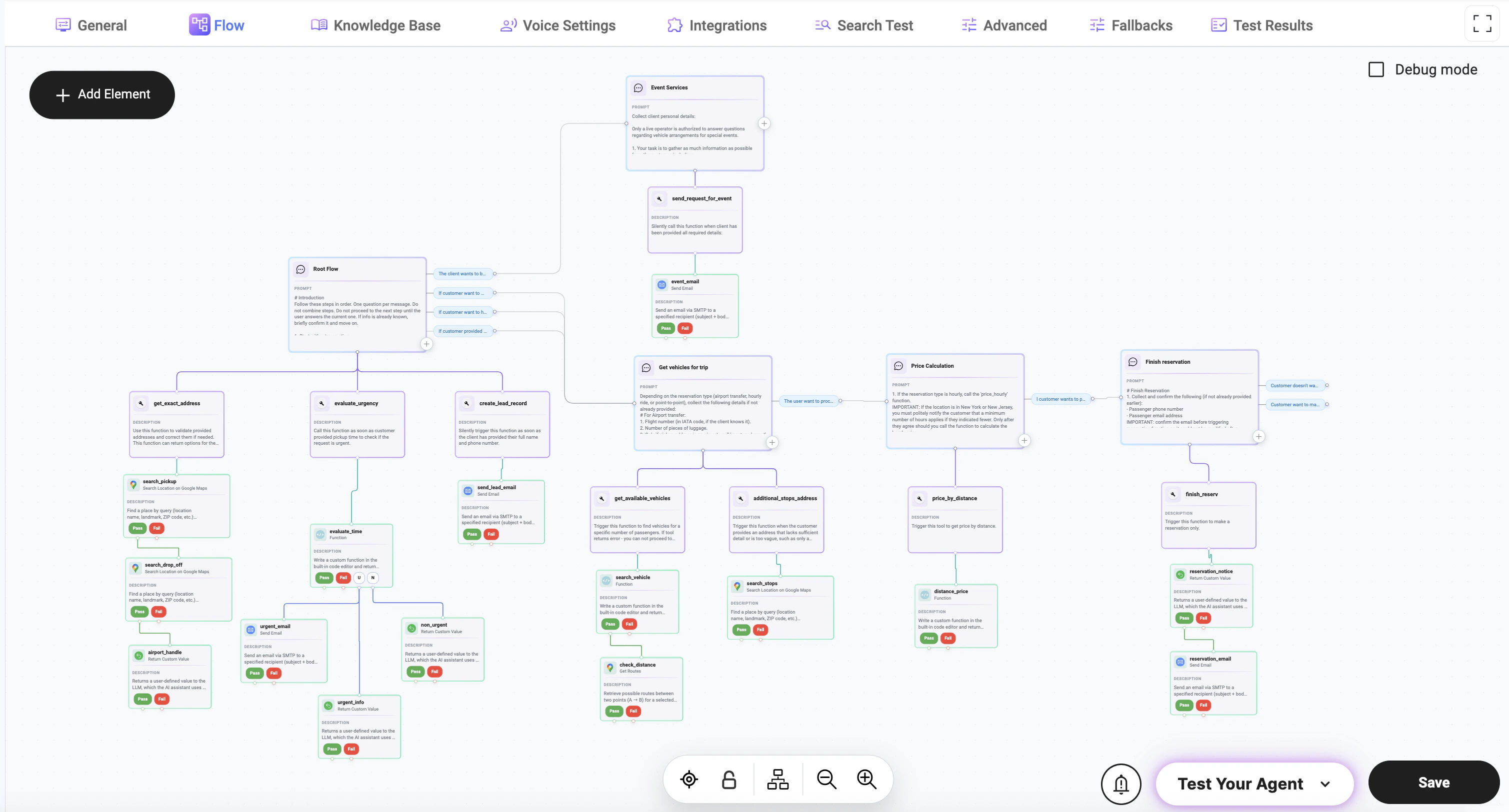 A **flow** is a visual and logical structure where each step of the conversation is represented by a node. Nodes are connected together to control how the interaction progresses based on user input, system state, and predefined logic.
The flow always starts from an **entry node** and dynamically moves between nodes until the interaction is completed.
## Adding Elements to the Flow
Click the **+ Add Element** button on the canvas to create a new element in your flow.
Available element types:
* **Node** — handles conversation logic
* **Action** — executes tools or system operations
To start building a flow, add a **Conversation** node.\
This node is used to send messages, ask questions, and collect user input.
All elements must be connected using transitions to define how the flow progresses.
***
## Node-Based Architecture
Each flow is composed of interconnected nodes that define how the interaction progresses.
A **node** is a configurable step in the flow. Depending on its setup, a node can be used to:
* collect user input (e.g., name, phone, address)
* send messages or prompts to the user
* apply logic or conditions
* trigger tools, APIs, or integrations
* process or transform data
* route the interaction to the next step
Nodes are flexible and can perform different roles depending on configuration.
***
## Node Configuration
Each node contains settings that control its behavior and interaction logic.
A **flow** is a visual and logical structure where each step of the conversation is represented by a node. Nodes are connected together to control how the interaction progresses based on user input, system state, and predefined logic.
The flow always starts from an **entry node** and dynamically moves between nodes until the interaction is completed.
## Adding Elements to the Flow
Click the **+ Add Element** button on the canvas to create a new element in your flow.
Available element types:
* **Node** — handles conversation logic
* **Action** — executes tools or system operations
To start building a flow, add a **Conversation** node.\
This node is used to send messages, ask questions, and collect user input.
All elements must be connected using transitions to define how the flow progresses.
***
## Node-Based Architecture
Each flow is composed of interconnected nodes that define how the interaction progresses.
A **node** is a configurable step in the flow. Depending on its setup, a node can be used to:
* collect user input (e.g., name, phone, address)
* send messages or prompts to the user
* apply logic or conditions
* trigger tools, APIs, or integrations
* process or transform data
* route the interaction to the next step
Nodes are flexible and can perform different roles depending on configuration.
***
## Node Configuration
Each node contains settings that control its behavior and interaction logic.
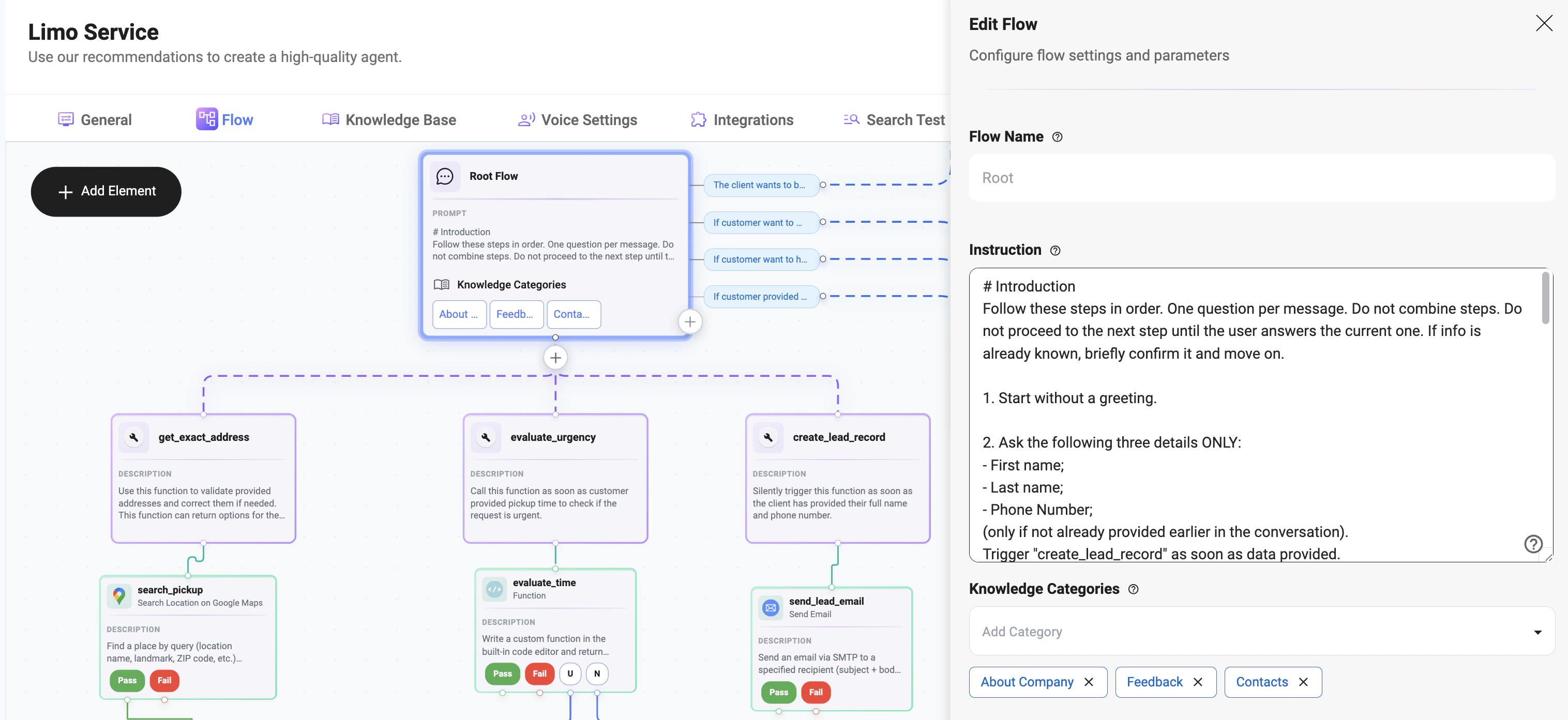 ### Flow Name
* Defines the name of the current flow
* Used for identification and organization
***
### Instruction
Defines how the agent should behave within this node.
This is the core logic that controls:
* how the agent communicates
* what data should be collected
* how the conversation progresses
Example:
```mdx theme={null}
# Introduction
Follow these steps in order. One question per message. Do not combine steps. Do not proceed to the next step until the user answers the current one. If info is already known, briefly confirm it and move on.
1. Start without a greeting.
2. Ask the following three details ONLY:
- First name;
- Last name;
- Phone Number;
(only if not already provided earlier in the conversation).
Trigger "create_lead_record" as soon as data provided.
```
### Flow Name
* Defines the name of the current flow
* Used for identification and organization
***
### Instruction
Defines how the agent should behave within this node.
This is the core logic that controls:
* how the agent communicates
* what data should be collected
* how the conversation progresses
Example:
```mdx theme={null}
# Introduction
Follow these steps in order. One question per message. Do not combine steps. Do not proceed to the next step until the user answers the current one. If info is already known, briefly confirm it and move on.
1. Start without a greeting.
2. Ask the following three details ONLY:
- First name;
- Last name;
- Phone Number;
(only if not already provided earlier in the conversation).
Trigger "create_lead_record" as soon as data provided.
```