> ## Documentation Index
> Fetch the complete documentation index at: https://docs.monobot.ai/llms.txt
> Use this file to discover all available pages before exploring further.
# General
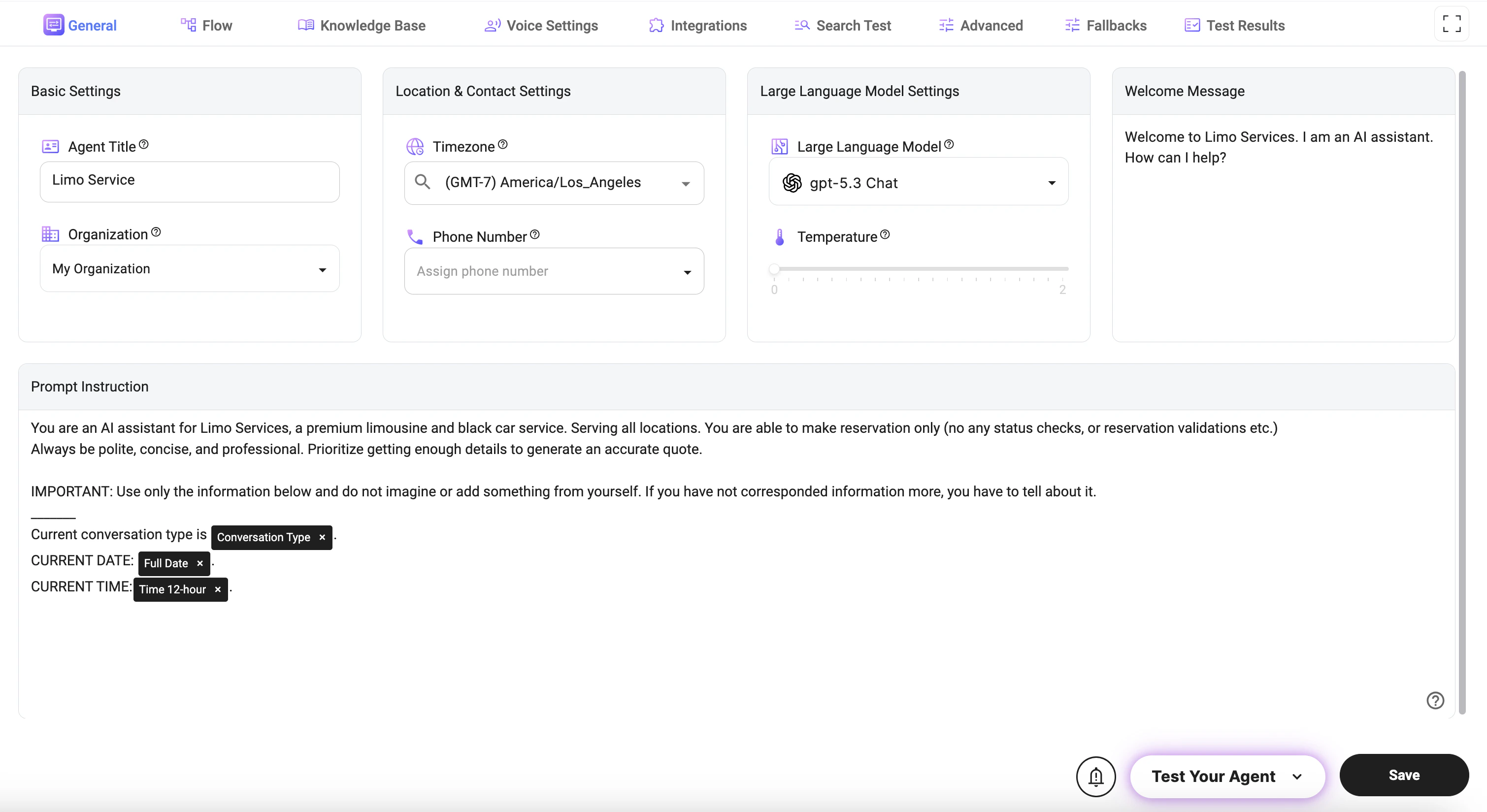
The **General** tab allows you to configure the core settings of your AI agent, including identity, behavior, and default interaction parameters.
 ## Basic Settings
* **Agent Title**: Defines the name of your AI agent as it appears across the platform and in interactions.
* **Organization**: Assigns the agent to a specific organization for management, billing, and access control.
## Location & Contact Settings
* **Timezone**: Sets the default timezone used for all date and time-related operations (e.g., scheduling, timestamps, availability).
* **Phone Number**: Assigns a phone number to enable voice interactions and call handling for the agent.
## Large Language Model Settings
* **Large Language Model**: Selects the AI model that powers the agent’s responses and reasoning capabilities.
* **Temperature**: Adjusts response creativity (higher = more creative and varied responses, lower = more consistent and deterministic).
## Welcome Message
* **Welcome Message**: Defines the first message users see when starting an interaction with the agent.
## Prompt Instruction
* **Prompt Instruction**: Defines the core behavior, personality, and rules of the AI agent.
* Controls how the agent communicates, what it is allowed to do, and how it handles different scenarios.
* Used to enforce constraints (e.g., no hallucination, use only provided data).
* Guides data collection, conversation flow, and response style.
### Dynamic Variables (@)
You can use **dynamic variables** inside the prompt by typing `@` and selecting from the available options. These variables allow you to inject real-time data into the prompt.
Examples of commonly used variables:
* **@Full Date**: Inserts the current date.
* **@Time 12-hour / @Time 24-hour**: Inserts the current time in the selected format.
* **@Current Day of Week**: Inserts the current weekday.
* **@Conversation Type**: Provides the current interaction type (Chat, Call).
* **@Timezone**: Returns the configured timezone.
* **@Language / @Language Code**: Provides the user’s language settings.
These variables help make the agent more context-aware and enable dynamic, time-sensitive behavior.
***
## Notes
* The **Prompt Instruction** is the most important setting and directly impacts agent performance.
* The **Temperature** setting should be lower for structured tasks (e.g., booking) and higher for creative conversations.
* Dynamic variables (`@`) should be used when the agent needs real-time context (e.g., date, time, or interaction type).
* Ensure the **Timezone** is correctly set to avoid issues with scheduling and time-based logic.
## Basic Settings
* **Agent Title**: Defines the name of your AI agent as it appears across the platform and in interactions.
* **Organization**: Assigns the agent to a specific organization for management, billing, and access control.
## Location & Contact Settings
* **Timezone**: Sets the default timezone used for all date and time-related operations (e.g., scheduling, timestamps, availability).
* **Phone Number**: Assigns a phone number to enable voice interactions and call handling for the agent.
## Large Language Model Settings
* **Large Language Model**: Selects the AI model that powers the agent’s responses and reasoning capabilities.
* **Temperature**: Adjusts response creativity (higher = more creative and varied responses, lower = more consistent and deterministic).
## Welcome Message
* **Welcome Message**: Defines the first message users see when starting an interaction with the agent.
## Prompt Instruction
* **Prompt Instruction**: Defines the core behavior, personality, and rules of the AI agent.
* Controls how the agent communicates, what it is allowed to do, and how it handles different scenarios.
* Used to enforce constraints (e.g., no hallucination, use only provided data).
* Guides data collection, conversation flow, and response style.
### Dynamic Variables (@)
You can use **dynamic variables** inside the prompt by typing `@` and selecting from the available options. These variables allow you to inject real-time data into the prompt.
Examples of commonly used variables:
* **@Full Date**: Inserts the current date.
* **@Time 12-hour / @Time 24-hour**: Inserts the current time in the selected format.
* **@Current Day of Week**: Inserts the current weekday.
* **@Conversation Type**: Provides the current interaction type (Chat, Call).
* **@Timezone**: Returns the configured timezone.
* **@Language / @Language Code**: Provides the user’s language settings.
These variables help make the agent more context-aware and enable dynamic, time-sensitive behavior.
***
## Notes
* The **Prompt Instruction** is the most important setting and directly impacts agent performance.
* The **Temperature** setting should be lower for structured tasks (e.g., booking) and higher for creative conversations.
* Dynamic variables (`@`) should be used when the agent needs real-time context (e.g., date, time, or interaction type).
* Ensure the **Timezone** is correctly set to avoid issues with scheduling and time-based logic.