> ## Documentation Index
> Fetch the complete documentation index at: https://docs.monobot.ai/llms.txt
> Use this file to discover all available pages before exploring further.
# Voice Settings
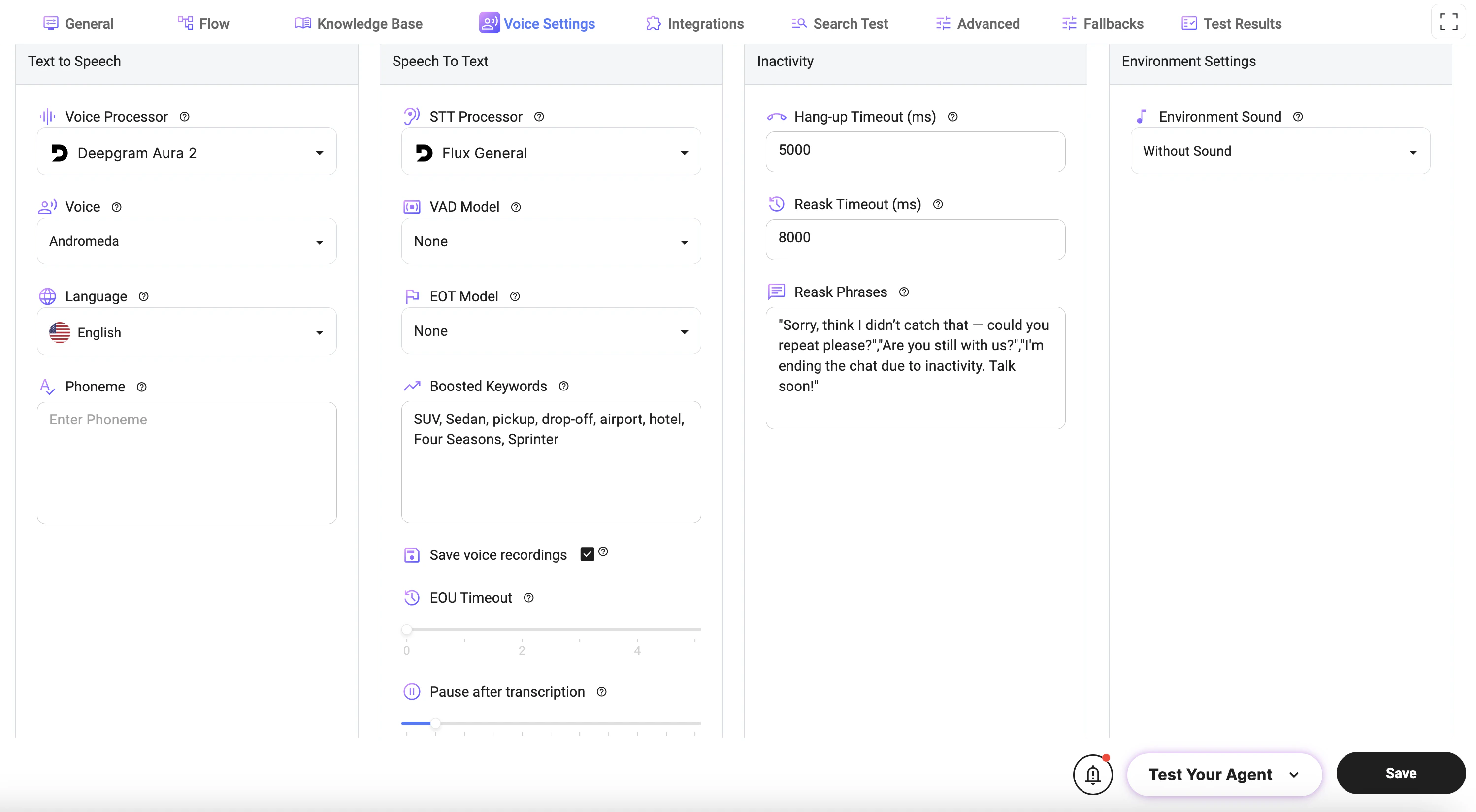
The **Voice Settings** tab allows you to configure how your AI agent handles voice interactions, including speech synthesis, speech recognition, and call behavior.
 ## Text to Speech (TTS)
Controls how the agent generates voice responses.
* **Voice Processor**: Selects the provider used for speech synthesis.
* **Voice**: Defines the voice style used for audio responses.
* **Language**: Sets the language for speech output.
* **Phoneme**: Allows custom pronunciation adjustments for specific words or phrases.
***
## Speech to Text (STT)
Controls how user speech is converted into text.
* **STT Processor**: Selects the speech recognition provider.
* **VAD Model (Voice Activity Detection)**: Detects when a user starts and stops speaking.
* **EOT Model (End of Turn)**: Determines when the user has finished speaking.
* **Boosted Keywords**: Improves recognition accuracy for specific words (e.g., names, locations, services).
* **Save Voice Recordings**: Enables saving of call recordings for later review.
* **EOU Timeout (End of Utterance)**: Defines how long the system waits before considering speech complete.
* **Pause After Transcription**: Adds a delay after transcription before processing continues.
***
## Inactivity Settings
Controls how the system handles user inactivity during voice interactions.
* **Hang-up Timeout (ms)**:\
Defines how long to wait before ending the call due to inactivity.
* **Reask Timeout (ms)**:\
Time before the system prompts the user again after no response.
* **Reask Phrases**:\
Messages used to re-engage the user (e.g., “Could you repeat that?”).
***
## Environment Settings
* **Environment Sound**:\
Adds background audio (or silence) to the interaction.
***
## How It Works
* User speaks → STT converts speech to text
* System processes input using Flow logic
* Response is generated
* TTS converts response to voice
* Audio is played back to the user
***
## Best Practices
* Use **Boosted Keywords** for domain-specific terms (e.g., vehicles, locations).
* Set **EOU Timeout** carefully to avoid cutting users off too early.
* Use clear and natural **Reask Phrases** to improve user experience.
* Keep **Hang-up Timeout** balanced to avoid premature call termination.
* Test voice quality and recognition accuracy in real scenarios.
***
## Notes
* Voice quality and recognition accuracy depend on the selected providers.
* Incorrect timeout settings may interrupt conversations.
* Background noise and accents may affect speech recognition performance.
## Text to Speech (TTS)
Controls how the agent generates voice responses.
* **Voice Processor**: Selects the provider used for speech synthesis.
* **Voice**: Defines the voice style used for audio responses.
* **Language**: Sets the language for speech output.
* **Phoneme**: Allows custom pronunciation adjustments for specific words or phrases.
***
## Speech to Text (STT)
Controls how user speech is converted into text.
* **STT Processor**: Selects the speech recognition provider.
* **VAD Model (Voice Activity Detection)**: Detects when a user starts and stops speaking.
* **EOT Model (End of Turn)**: Determines when the user has finished speaking.
* **Boosted Keywords**: Improves recognition accuracy for specific words (e.g., names, locations, services).
* **Save Voice Recordings**: Enables saving of call recordings for later review.
* **EOU Timeout (End of Utterance)**: Defines how long the system waits before considering speech complete.
* **Pause After Transcription**: Adds a delay after transcription before processing continues.
***
## Inactivity Settings
Controls how the system handles user inactivity during voice interactions.
* **Hang-up Timeout (ms)**:\
Defines how long to wait before ending the call due to inactivity.
* **Reask Timeout (ms)**:\
Time before the system prompts the user again after no response.
* **Reask Phrases**:\
Messages used to re-engage the user (e.g., “Could you repeat that?”).
***
## Environment Settings
* **Environment Sound**:\
Adds background audio (or silence) to the interaction.
***
## How It Works
* User speaks → STT converts speech to text
* System processes input using Flow logic
* Response is generated
* TTS converts response to voice
* Audio is played back to the user
***
## Best Practices
* Use **Boosted Keywords** for domain-specific terms (e.g., vehicles, locations).
* Set **EOU Timeout** carefully to avoid cutting users off too early.
* Use clear and natural **Reask Phrases** to improve user experience.
* Keep **Hang-up Timeout** balanced to avoid premature call termination.
* Test voice quality and recognition accuracy in real scenarios.
***
## Notes
* Voice quality and recognition accuracy depend on the selected providers.
* Incorrect timeout settings may interrupt conversations.
* Background noise and accents may affect speech recognition performance.