Overview
Pass / Fail conditions define how your flow continues after an action is executed. Each action can have two pre-configured outcomes:- Pass — the action completed successfully
- Fail — the action failed (error, validation issue, external service failure, etc.)
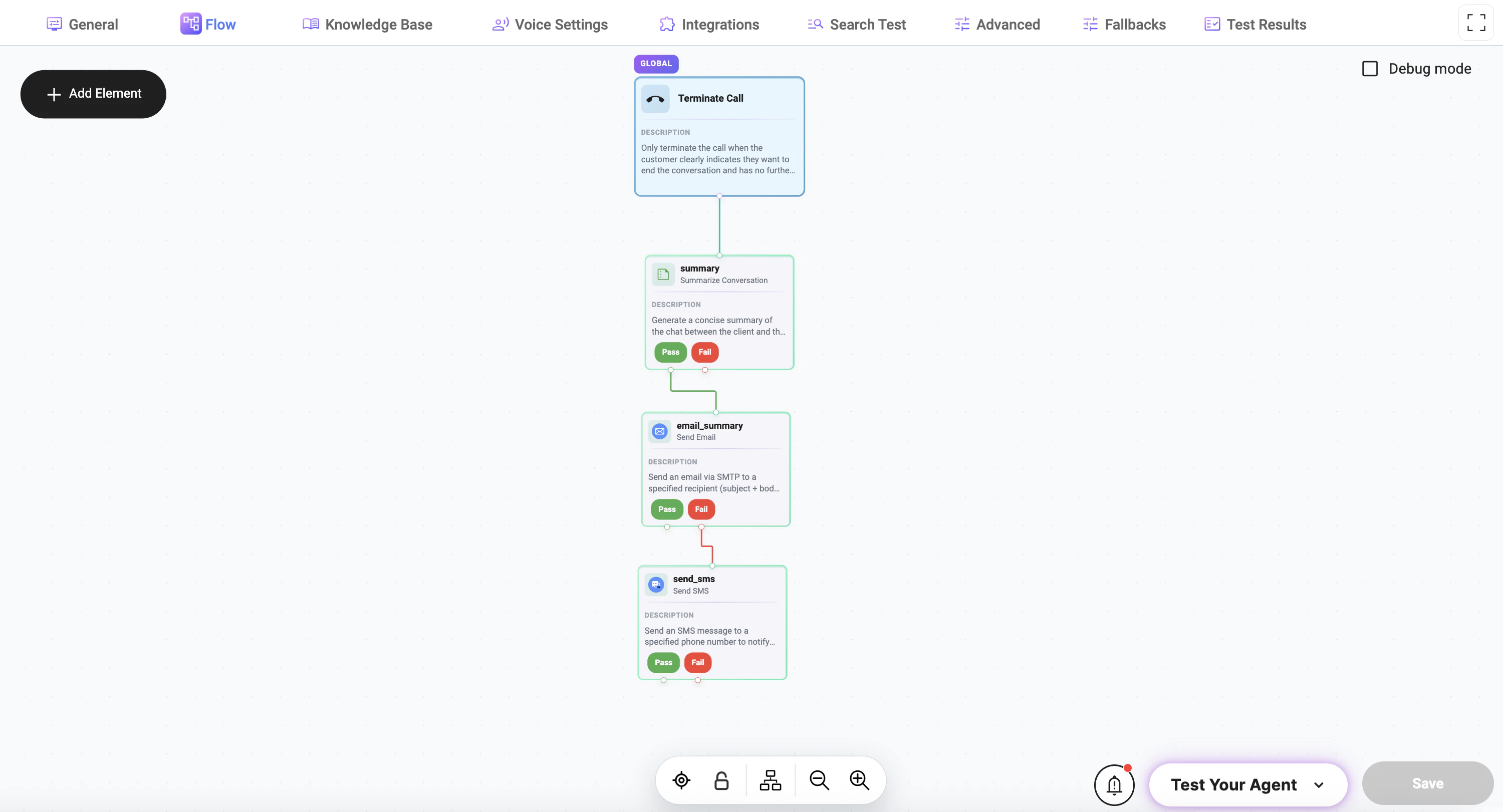
How It Works
When an action is executed:- If it succeeds → the Pass path is triggered
- If it fails → the Fail path is triggered
Basic Logic
Action → Pass → Next Step A→ Fail → Next Step B
Example: Summary → Email
Flow:
- Summarize Conversation
- If successful → send email
Logic:
- If summary is generated → proceed to email
- If summary fails → stop or handle separately
Example: Email with SMS Fallback
Flow:
- Generate summary
- Send email
- If email fails → send SMS
Logic:
Summary → Pass → EmailEmail → Pass → End
Email → Fail → Send SMS
Real Use Case
Scenario:
- Primary communication: Email
- Backup channel: SMS
Behavior:
- If email is delivered → flow ends
- If email fails → SMS is sent automatically
Why Use Pass / Fail
Reliability
Handle failures gracefully instead of breaking the flow.Flexibility
Different outcomes can trigger different logic paths.Better UX
Users still receive communication even if one channel fails.Best Practices
- Handle Fail paths
- Use fallback channels (Email → SMS)
- Keep flows simple
Common Patterns
Success Chain
Step 1 → Pass → Step 2 → Pass → Step 3Fallback Handling
Email → Fail → SMSConditional Recovery
API Call → Fail → AlternativeSilent Failure
Optional Step → Fail → ContinueNotes
- Pass/Fail depends on action execution result
- Design flows assuming failures can happen
Summary
Pass / Fail conditions allow you to:- control execution flow
- handle errors properly
- build resilient automations