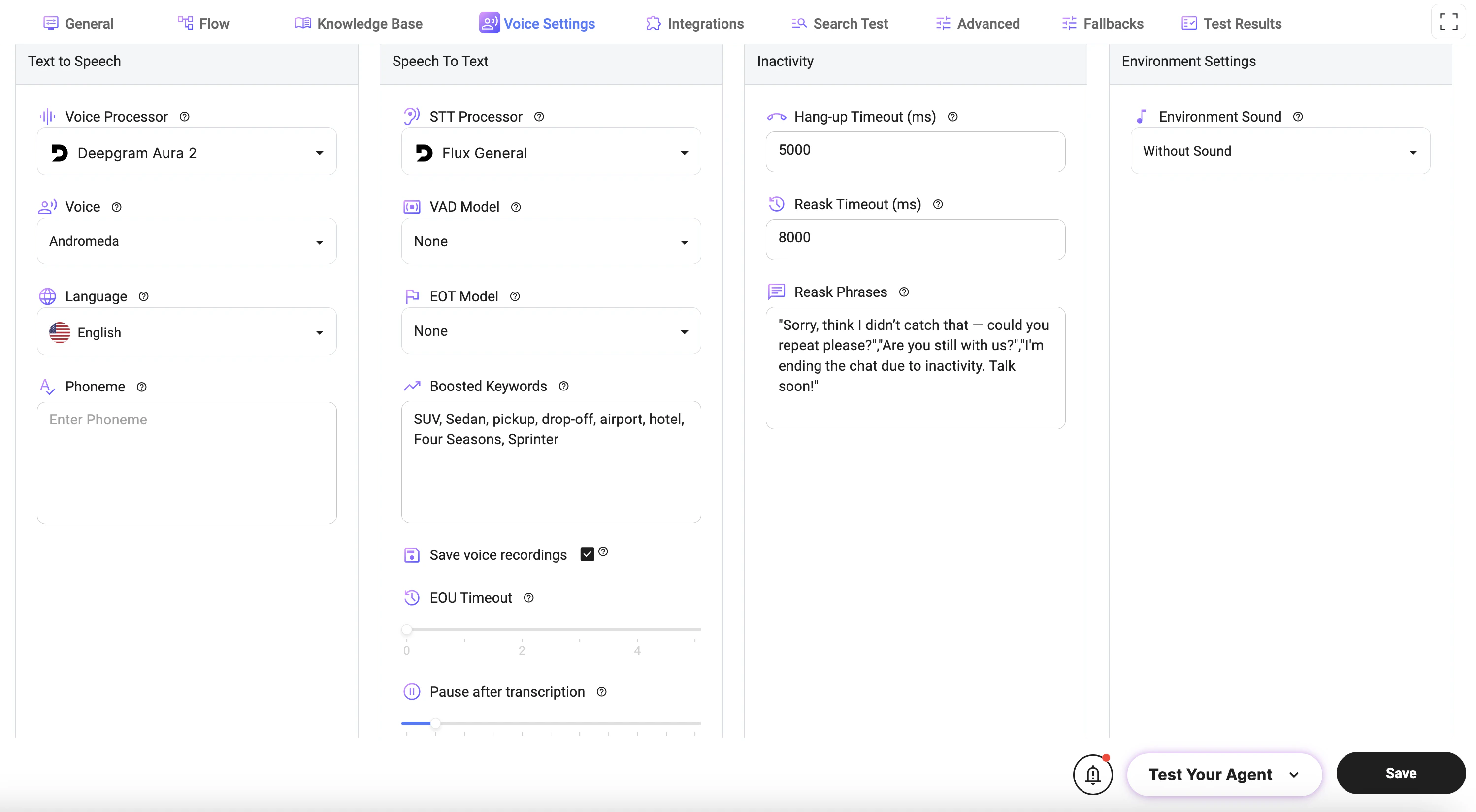
Text to Speech (TTS)
Controls how the agent generates voice responses.- Voice Processor: Selects the provider used for speech synthesis.
- Voice: Defines the voice style used for audio responses.
- Language: Sets the language for speech output.
- Phoneme: Allows custom pronunciation adjustments for specific words or phrases.
Speech to Text (STT)
Controls how user speech is converted into text.- STT Processor: Selects the speech recognition provider.
- VAD Model (Voice Activity Detection): Detects when a user starts and stops speaking.
- EOT Model (End of Turn): Determines when the user has finished speaking.
- Boosted Keywords: Improves recognition accuracy for specific words (e.g., names, locations, services).
- Save Voice Recordings: Enables saving of call recordings for later review.
- EOU Timeout (End of Utterance): Defines how long the system waits before considering speech complete.
- Pause After Transcription: Adds a delay after transcription before processing continues.
Inactivity Settings
Controls how the system handles user inactivity during voice interactions.-
Hang-up Timeout (ms):
Defines how long to wait before ending the call due to inactivity. If Reask Timeout and Reask Phrases are configured, the hang-up timer starts after all reask phrases have been played. -
Reask Timeout (ms):
Time before the system prompts the user again after no response. -
Reask Phrases:
A comma-separated list of phrases used to re-engage the user (e.g., “Could you repeat that?”, “Are you still there?”). The phrases are played sequentially, one by one, each time a reask is triggered.
Environment Settings
- Environment Sound:
Adds background audio (or silence) to the interaction.
How It Works
- User speaks → STT converts speech to text
- System processes input using Flow logic
- Response is generated
- TTS converts response to voice
- Audio is played back to the user
Best Practices
- Use Boosted Keywords for domain-specific terms (e.g., vehicles, locations).
- Set EOU Timeout carefully to avoid cutting users off too early.
- Use clear and natural Reask Phrases to improve user experience.
- Keep Hang-up Timeout balanced to avoid premature call termination.
- Test voice quality and recognition accuracy in real scenarios.
Notes
- Voice quality and recognition accuracy depend on the selected providers.
- Incorrect timeout settings may interrupt conversations.
- Background noise and accents may affect speech recognition performance.