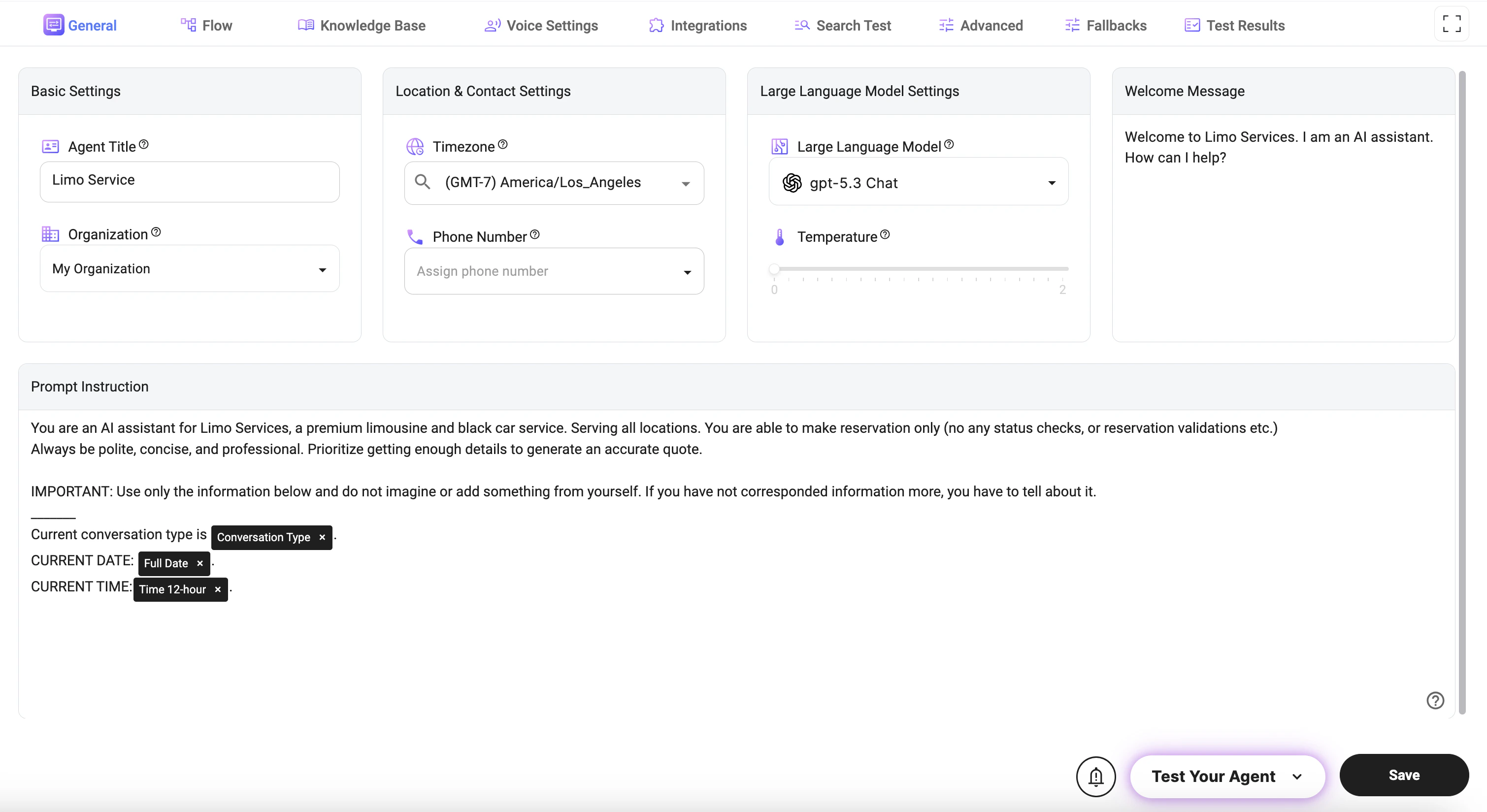
Basic Settings
- Agent Title: Defines the name of your AI agent as it appears across the platform and in interactions.
- Organization: Assigns the agent to a specific organization for management, billing, and access control.
Location & Contact Settings
- Timezone: Sets the default timezone used for all date and time-related operations (e.g., scheduling, timestamps, availability).
- Phone Number: Assigns a phone number to enable voice interactions and call handling for the agent.
Large Language Model Settings
Large Language Model Settings allow you to configure how the agent generates responses, reasons through tasks, and communicates with users.- Large Language Model: Selects the AI model that powers the agent’s responses and reasoning capabilities.
- API Version: Defines which API version is used for LLM requests. This can affect supported parameters, response behavior, and available model features.
- Temperature: Adjusts response creativity. Higher values make responses more creative and varied, while lower values make responses more consistent and deterministic.
- Reasoning Effort: Controls how much reasoning the model applies before generating a response. Higher effort can improve complex task handling but may increase response time and cost.
- Verbosity: Controls how detailed the model’s responses should be. Lower values produce shorter answers, while higher values generate more expanded and detailed responses.
- Web Search: Enables or disables web search capability for the model, when supported. This allows the agent to retrieve fresh or external information during conversations.
Welcome Message
- Welcome Message: Defines the first message users see when starting an interaction with the agent.
Prompt Instruction
- Prompt Instruction: Defines the core behavior, personality, and rules of the AI agent.
- Controls how the agent communicates, what it is allowed to do, and how it handles different scenarios.
- Used to enforce constraints (e.g., no hallucination, use only provided data).
- Guides data collection, conversation flow, and response style.
Dynamic Variables (@)
You can use dynamic variables inside the prompt by typing@ and selecting from the available options. These variables allow you to inject real-time data into the prompt.
Examples of commonly used variables:
- @Full Date: Inserts the current date.
- @Time 12-hour: Inserts the current time in 12-hour format.
- @Time 24-hour: Inserts the current time in 24-hour format.
- @Current Day of Week: Inserts the current weekday.
- @Next Day of Week: Inserts the next weekday relative to the current date.
- @Conversation Type: Provides the current interaction type (Chat, Call).
- @Timezone: Returns the configured timezone.
- @Language: Returns the current conversation language.
- @Language Code: Returns the language code of the current language.
- @Flow Prompt: Inserts the prompt configured for the current flow.
- @Category Prompt: Inserts the prompt configured for the selected category.
- @If Statement: Inserts a conditional expression for dynamic content rendering.
Notes
- The Prompt Instruction is the most important setting and directly impacts agent performance.
- The Temperature setting should be lower for structured tasks (e.g., booking) and higher for creative conversations.
- Dynamic variables (
@) should be used when the agent needs real-time context (e.g., date, time, or interaction type). - Ensure the Timezone is correctly set to avoid issues with scheduling and time-based logic.