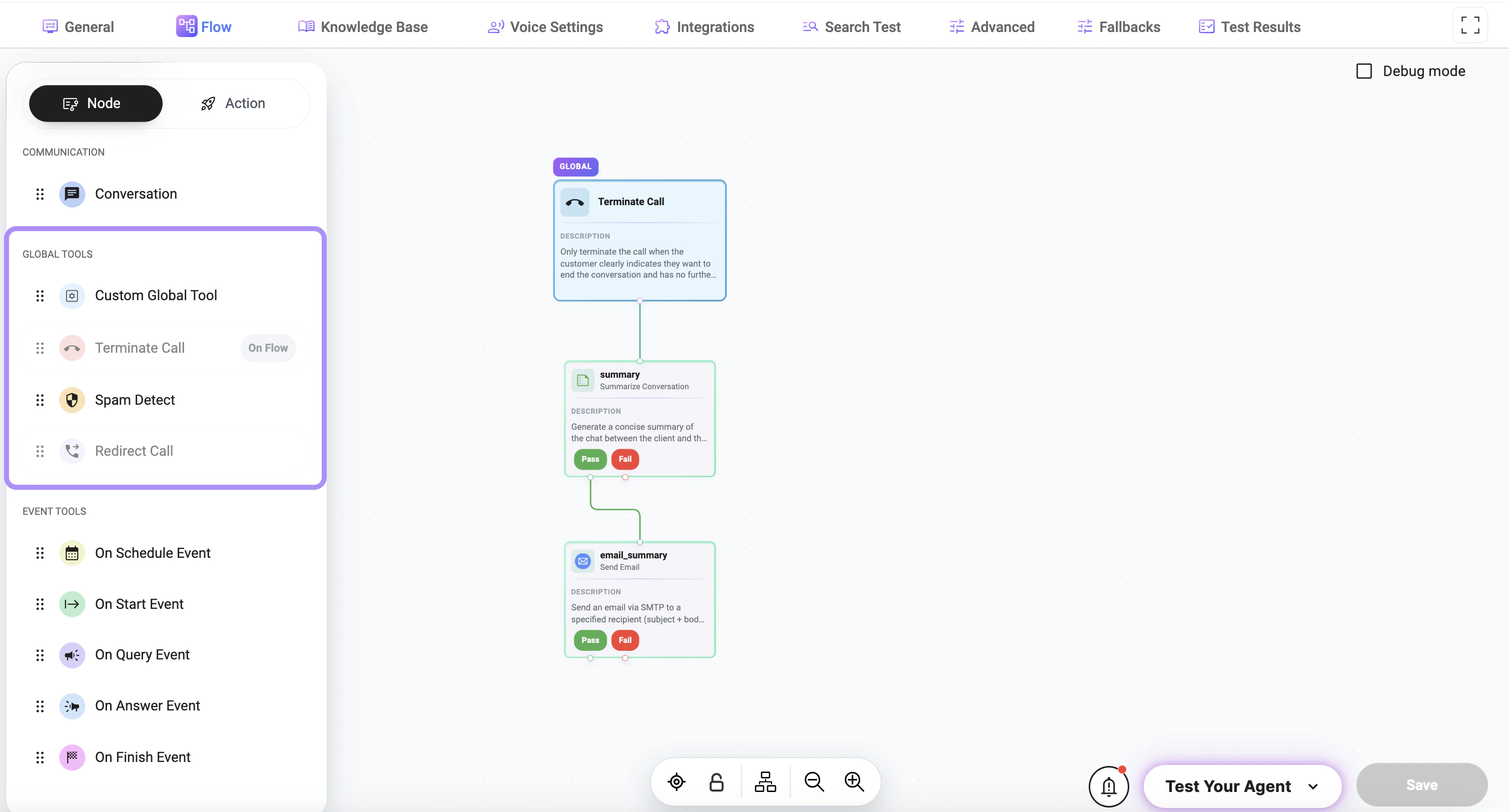
Using Global Tools in Flow
Click the + Add Element button on the canvas to create a new element in your flow:- select Node
- choose the required tool under the Global Tools section
What are Global Tools
A global tool is a reusable tool defined at the project level instead of being limited to a single node or flow. This makes it easier to:- reuse the same tool across multiple flows
- centralize tool configuration
- maintain consistent behavior
- reduce duplicate tool definitions
- custom global tools
- spam detection
- call termination
- call redirection
How It Works
Global tools are available in the global configuration area and can be assigned where needed. Depending on the tool configuration, a global tool can:- be available for calls
- be available for chats
- be available for both
- be triggered from a node
- be used automatically as part of flow behavior
Tool States
A global tool may appear in different states depending on configuration:- Enabled — the tool is ready to be used
- Disabled — the tool exists but is not currently active
Typical Global Tools
Custom Global Tool
A reusable custom tool that can be configured and applied across multiple flows.Terminate Call
Ends the call when the configured condition is met.Spam Detect
Used to identify spam or unwanted interactions.Redirect Call
Transfers the call to another destination or handling path.Relationship to Flows and Nodes
Global tools are configured centrally, but they are typically executed within the context of a node or flow. This means:- the tool can be defined once globally
- the flow decides when it should be used
- the node provides the context, collected values, or trigger conditions
Best Practices
- Use global tools for actions shared across multiple flows
- Keep tool names clear and specific
- Avoid creating duplicate tools for the same purpose
- Review whether a tool should be global or node-specific
- Test global tools in the flows where they are used
Configuration
Some tools include specific settings depending on their functionality. Examples:-
Answer:
Defines the message sent before the action is executed
(e.g., what the assistant says before terminating the call) -
Description:
Defines when and how the tool should be triggered Used by the system to determine:- when to execute the tool
- under which conditions it should be applied
-
Announcement:
Defines an optional message sent before the tool is executed Used to:- inform the user about the upcoming action
- provide a smoother interaction
-
Parameters:
Defines the values the tool expects during execution- may be empty for built-in tools
- used when structured input is required
- supports dynamic values collected during the flow
Redirect Call Configuration
Defines specific settings for transferring a call to another destination.-
Transfer To:
Defines the phone number used for call transfer -
Is SIP:
Defines whether the destination is a SIP address instead of a phone number -
Silent Call Summarization:
Defines whether the call summary is generated without notifying the user -
Introduction:
Defines the message said before initiating the call transfer -
Declined:
Defines the message used if the call transfer is declined
Notes
- Built-in tools may have predefined configuration fields
- Tool behavior depends on both configuration and description
- Proper setup ensures correct and predictable execution
- Global tools improve reusability and consistency across the project
- Not every tool needs to be global
- Tools that are highly specific to one step are often better configured directly in the relevant node