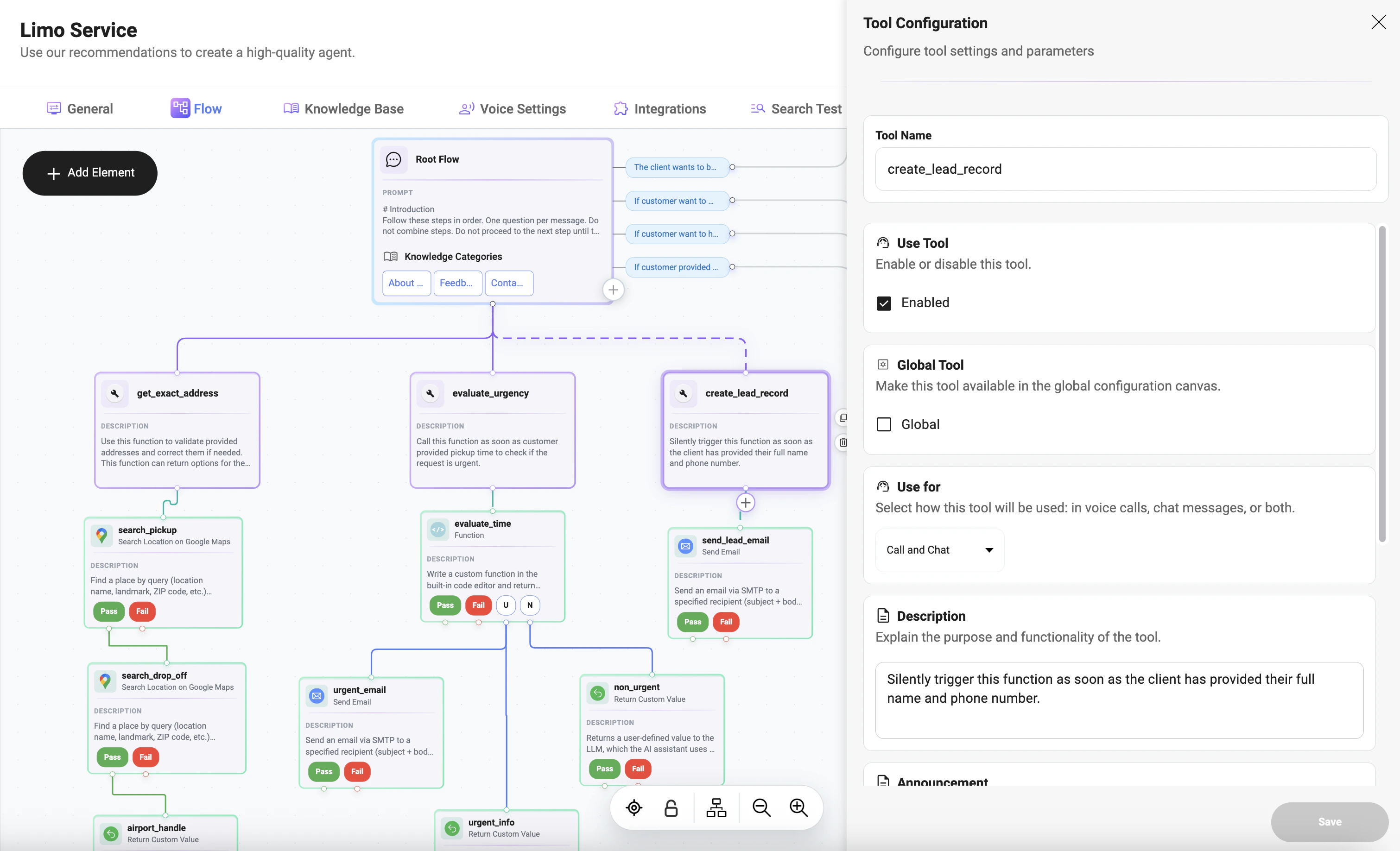
Adding a Custom Tool to a Node
Click the + button under the node to add a tool. The tool will be executed based on the node logic and tool configuration. Multiple tools can be added if needed.General Configuration
-
Tool Name:
Unique identifier used in flows (e.g.,create_lead_record). -
Use Tool (Enabled):
Enables or disables execution of the tool. -
Global Tool:
Makes the tool available in the global configuration canvas. -
Force Tool:
Forces the tool to execute before all other actions in the flow. -
Use For:
Defines where the tool can be used:- Call
- Chat
- Call and Chat
Description
Defines when and how the tool should be triggered. This is critical because the system uses this text to understand:- when to call the tool
- under which conditions it should run
- whether it should be triggered silently or as part of a visible interaction
Announcement
The Announcement is a message shown to the user before the tool is executed. Example:Parameters
Parameters define the values the tool will use during execution. Each parameter represents a piece of data passed into the tool.Parameter Fields
-
Name:
Parameter key used in the request (e.g.,name,pickup_location) -
Description:
Explains what the parameter represents. Examples:
-
Possible Values:
Defines allowed values for the parameter.
Values should be provided as a comma-separated list (e.g.,SEDAN, SUV, VAN).
This acts like an enum and helps guide valid inputs. -
Required:
Indicates whether the parameter must be collected before the tool can be executed.
If enabled, the system will ensure the value is provided before triggering the tool.
Using Values Collected in a Node
Tool parameters can use values collected during node execution:- first name
- last name
- phone number
- addresses
- other user-provided data
Tool Usage in Nodes
Tools are assigned to nodes.- One node can trigger one or multiple tools
- Tools use data collected in the node
Execution Flow
- Node is reached
- Parameters are checked
- Missing data collected
- Announcement (optional)
- Tool executes
- Result used in flow
Notes
- Tools depend on node data
- Parameters connect user input with actions